The traditional barrier to entry for software development—years of formal training, complex syntax memorization, and arduous debugging—is rapidly dissolving. As artificial intelligence models evolve from passive assistants into proactive agents, the landscape of digital creation is undergoing a radical shift. Leading this charge is Claude Code, an agentic AI tool developed by Anthropic that empowers users to build, automate, and deploy applications using nothing more than natural language.
Contrary to the lingering myth that high-level programming requires a background in computer science, current AI capabilities have made technical fluency an optional luxury rather than a prerequisite. Today, some of the most prolific automation creators in the digital space have never written a manual line of code. By leveraging Claude Code, individuals can bridge the gap between abstract ideas and functional software, effectively democratizing the power of automation.
The Paradigm Shift: Why Claude Code Changes Everything
For years, building even a modest integration—such as syncing a Gmail inbox with a digital calendar—required a specialized skill set. A user would typically need to navigate complex API documentation, manage sensitive secret keys, secure OAuth credentials, and spend countless hours troubleshooting cryptic errors on forums like Stack Overflow.
Claude Code eliminates this friction by acting as a bridge between intent and execution. It is an agentic tool designed to operate within a command-line interface (CLI), allowing it to research, write code, establish secure connections between disparate applications, and execute complex workflows based on simple, conversational instructions.
Core Fundamentals for New Users
Before diving into the terminal, prospective users must account for two primary requirements:
- The Subscription Model: To utilize Claude Code effectively, a paid Claude Pro subscription is essential. This subscription provides the necessary compute resources and access to Anthropic’s most advanced models, which are required for the complex reasoning involved in building automations.
- The Command-Line Environment: Claude Code functions within a terminal—a text-based interface. While the prospect of a black screen with white text may seem intimidating to those accustomed to visual interfaces, it is a remarkably efficient environment. It is not about "coding" in the traditional sense; it is about providing clear, logical instructions to an agent that handles the underlying syntax.
Crucial Safety Note: Transparency is a cornerstone of Anthropic’s design. Claude Code operates with a "human-in-the-loop" philosophy. By default, the tool will seek explicit permission before performing any action that impacts your local system, such as browsing the web, creating files, or executing system-level changes. Users retain full control over every action the agent takes.
Chronology of Setup: From Zero to Automation
Getting started with Claude Code is a streamlined process designed for accessibility. Follow these steps to transition from installation to your first functional project.
Phase 1: Installation and Authentication
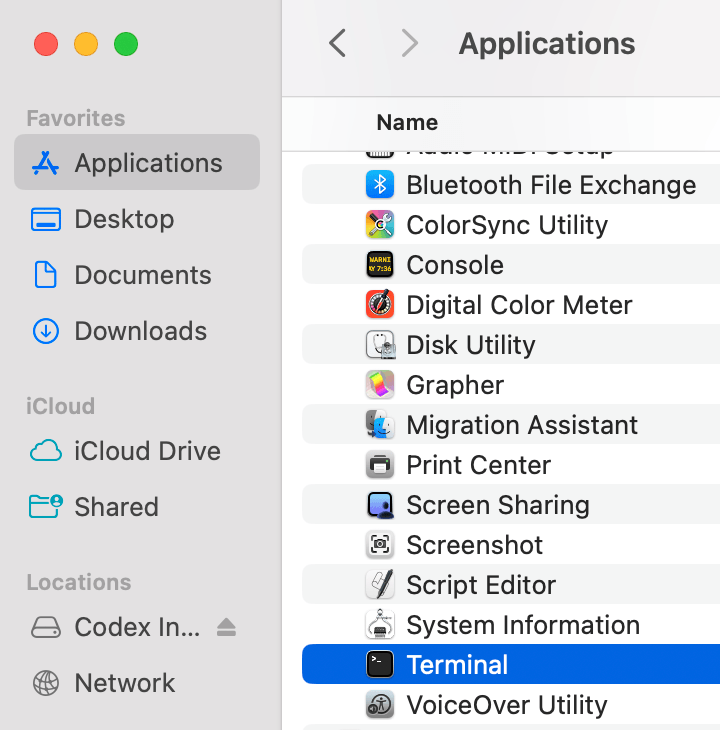
The journey begins by opening your operating system’s terminal (Terminal on macOS, or the equivalent command-line environment on Windows or Linux).
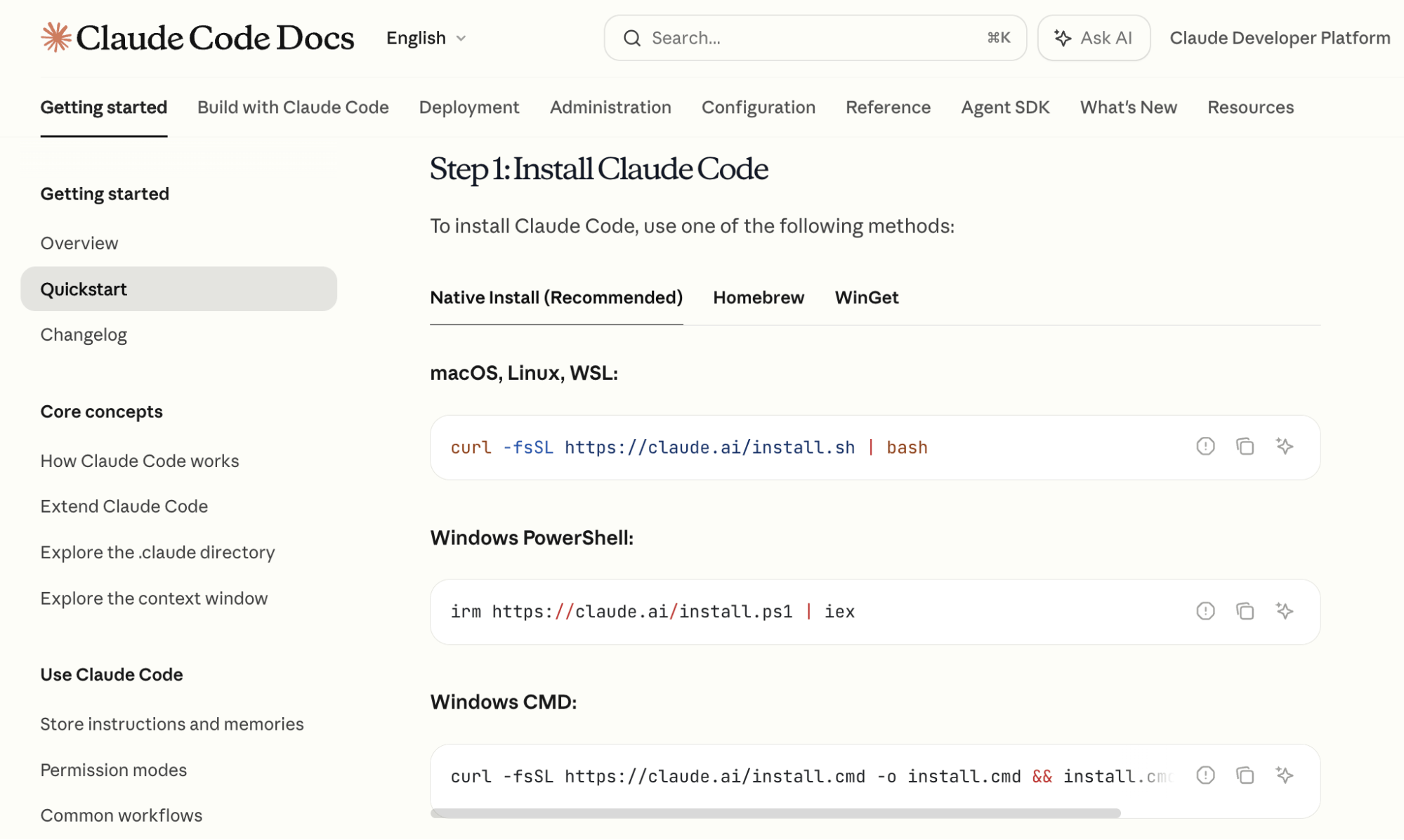
- Follow the Official Documentation: Navigate to the official Claude Code documentation. You will find standardized, copy-and-paste installation commands tailored to your specific OS.
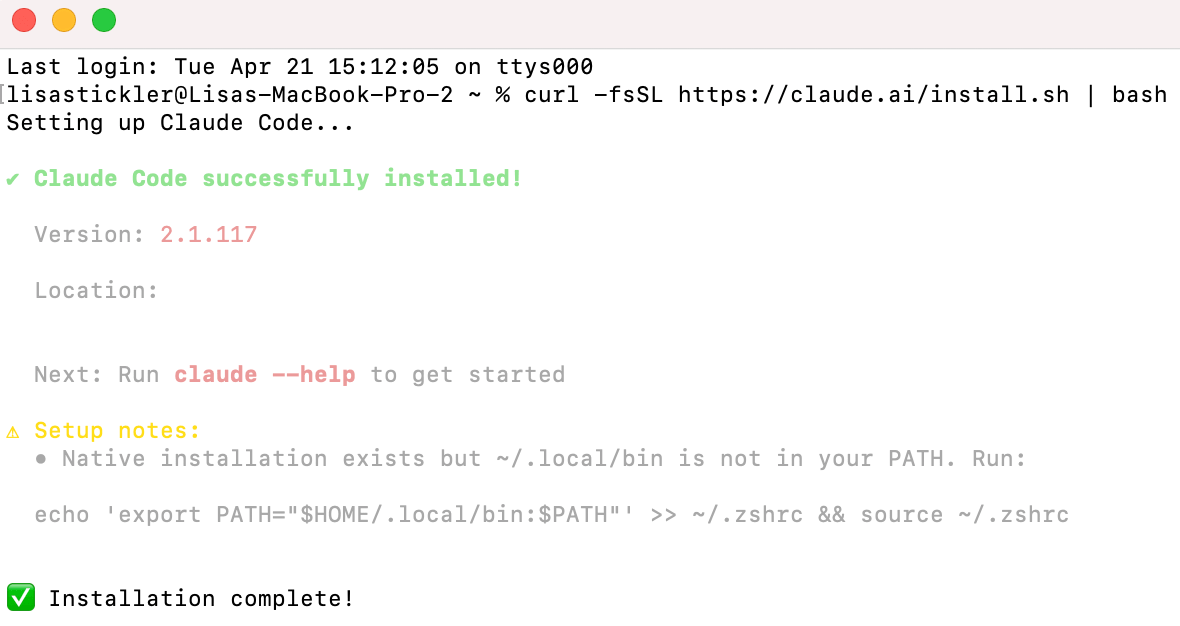
- Deployment: Paste the command into your terminal and execute it. Once the installation confirms completion, type
claudeto initialize the interface. - Authentication: Upon initialization, the tool will prompt a browser-based login. Sign in with the credentials associated with your Claude Pro account. Once authenticated, you are ready to select your preferred model and begin your project.
Phase 2: Mastering the Terminal Workflow
Claude Code relies on "slash commands" to manage its environment. Two essential commands every user should memorize include:
- /model: This command allows you to toggle between different versions of Claude. For complex projects, experts recommend a two-step approach: use Claude 3.5 Opus during the planning phase to leverage its superior reasoning and context window, then switch to Claude 3.5 Sonnet for the actual coding and implementation, as it offers an optimal balance of speed, accuracy, and token efficiency.
- /compact: As your conversation with the agent grows, the "context window" (the amount of information the AI can hold in its "working memory") will fill up. Use
/compactto generate a summary of your session, which clears space while retaining the project’s historical context.
Supporting Data: Enhancing Productivity with Advanced Features
Once the basics are mastered, two specific features serve to exponentially increase your productivity: Custom Skills and Persistent Markdown Files.
The Power of Custom Skills
A "Custom Skill" is essentially a macro for your AI agent. If you find yourself performing the same research or organizational task repeatedly, you can instruct Claude Code to package these instructions into a reusable slash command.
For example, a user might instruct the agent: "Search YouTube for my top five competitors, identify their highest-performing videos from the last two weeks, extract the titles and descriptions, and download the audio for transcription." Once Claude saves this as a custom skill, the entire multi-step process can be triggered with a single command in future sessions, saving hours of manual labor.

The Role of CLAUDE.md
To ensure the AI maintains a "long-term memory" of your project, use the /init command to generate a CLAUDE.md file. This is a plain-text document that acts as the "brain" of your project. It contains a summary of what has been built, the current state of the project, and the overarching goals. Every time you open a new session, the AI reads this file first, ensuring it is always aligned with your previous progress.
Case Study: Building a Personal Assistant (Google Calendar + Telegram)
To demonstrate the efficacy of this tool, let’s look at the classic "Daily Briefing" automation. The goal: create an agent that reads your Google Calendar and sends a summary of the next day’s schedule to your Telegram app.
Step 1: Connecting the Ecosystem
Open Claude Code and enter: "I want to have access to my Google Calendar. Tell me how to do this." If the response feels too technical, simply add the suffix: "Explain like I’m five." The agent will guide you through the OAuth authentication process, assisting in the retrieval of the necessary credentials from the Google Developer Console.
Step 2: Telegram Integration
Type /telegram in the terminal. The agent will walk you through the configuration of a Telegram bot—a specialized account that acts as a secure communication channel between the AI and your mobile device.
Step 3: Deployment
Once the connections are established, provide the final directive: "Read my Google Calendar and send me a Telegram message every morning with a summary of the next day’s schedule." The agent will write the necessary script and confirm the automation is active.
As long as your terminal remains open, the agent will monitor your calendar and push notifications to your phone. The beauty of this integration is its bidirectional nature: you can message your Telegram bot to add items to your calendar or ask for schedule optimizations while on the go.
Implications for the Future of Work
The rise of Claude Code signifies a transition from "user" to "architect." By lowering the barrier to technical creation, Anthropic is enabling entrepreneurs, marketers, and independent creators to build bespoke tools that were previously the domain of expensive engineering teams.
The implications for professional productivity are profound. When an individual can automate the mundane—data entry, calendar management, and research aggregation—the "human" element of work shifts toward strategy, creativity, and decision-making.
Conclusion: The New Frontier
Claude Code is not merely a tool for writing lines of code; it is an agent for operational efficiency. It represents a fundamental shift in how we interact with technology. By embracing the terminal, mastering the art of the prompt, and utilizing persistent memory files, you are no longer limited by what software is available in the marketplace. You are limited only by the scope of your imagination.
Whether you are looking to streamline your daily routine or build complex, custom-tailored applications for your business, the path to implementation is now open to everyone. The era of the "no-code developer" has arrived, and it is powered by the intelligence of agents like Claude.