By the Editorial Team
Co-created by Lauren deVane and Michael Stelzner
In the fast-evolving landscape of digital marketing, artificial intelligence has fundamentally altered how visual content is produced. Yet, a pervasive frustration plagues creators and brands alike: why do so many AI-generated images look identical?
From plastic-skinned avatars to predictable color palettes and cookie-cutter composition, the web is increasingly flooded with generic visual outputs often dismissed as "AI slop." However, industry experts argue that blaming the technology is a mistake. The issue is not the capability of modern generative models, but the skill and methodology of the operators behind them.
According to AI strategist Lauren deVane, comparing current-generation AI imagery to real-world photography based on lazy prompting is akin to judging all piano music by the sound of a toddler smashing keys in a waiting room. "Mozart exists," deVane notes. "We just are judging it based on this kid smashing keys."
Main Facts: The Evolution and Pitfalls of Generative Imagery
The technology behind AI image generation has shifted radically since early models like early-version DALL-E produced distorted hands and uncanny valley expressions. Early models relied on diffusion-based architectures—starting with pure noise and chipping away like a digital sculptor.
Modern systems, particularly OpenAI’s GPT Image and multi-model tools like Magnific, operate fundamentally differently. They utilize massive neural networks trained on billions of pixel-to-text patterns. Backed by large language models (LLMs), these systems can process context, interpret reference images, analyze current events, and render complex typographic layouts with precision.
Despite these advancements, most marketers continue to yield mediocre results because of superficial prompting. Entering vague requests like "make me a flyer" forces the AI to rely on its default mathematical averages—resulting in uninspired layouts, predictable font choices, and formulaic icon placements.
To overcome this, marketers must transition from casual users to intentional directors, leveraging structured frameworks, precise reference inputs, and multi-model platforms.
Chronology: From Experimental Novelty to Brand-Scale Asset Engines
The transformation of AI image generation can be tracked across three distinct eras:

- The Experimental Phase (Early Diffusion Models): Marked by trial-and-error text prompts, severe anatomical distortions (such as extra fingers), and a reliance on sheer luck to produce a usable image. Users viewed AI as a novelty toy rather than a production tool.
- The Integration Phase (LLM-Backed Reasoning): The introduction of language-model-backed image generation allowed systems to parse contextual instructions, interpret multi-layered text requirements, and handle complex typography without failing.
- The Orchestration Phase (Multi-Model Ecosystems & Reference Control): Today, platforms like Magnific and integrations via Model Context Protocol (MCP) allow creators to orchestrate multiple AI engines simultaneously. Marketers can now feed exact brand parameters, hex codes, and product reference sheets into systems that generate cohesive, multi-angle visual campaigns in seconds.
Supporting Data & Practical Marketing Use Cases
The true value of advanced AI imaging lies in solving content volume and brand consistency challenges that traditional photography cannot match.
Scaling Product Variations
For product-based businesses—such as Consumer Packaged Goods (CPG) brands or e-commerce companies with hundreds of SKUs—traditional product photography is cost-prohibitive and slow. By establishing a core prompt template and feeding in reference images for individual product variants (e.g., different flavors of sparkling water or distinct 3D-printed animal models), brands can generate hundreds of contextually accurate, cohesive images instantly.
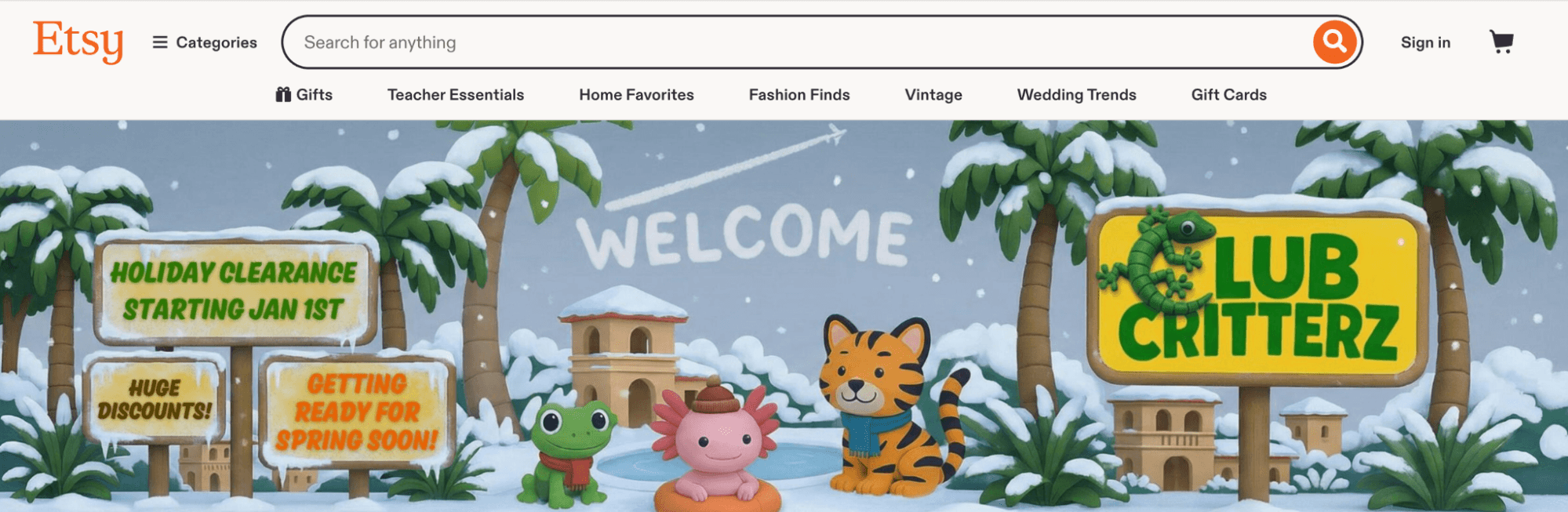
For instance, deVane utilized custom prompt workflows for her family’s company, Club Critterz, generating 800 unique, cohesive product visuals derived from a single foundational template structure.
B2B and Service-Based Brand Worlds
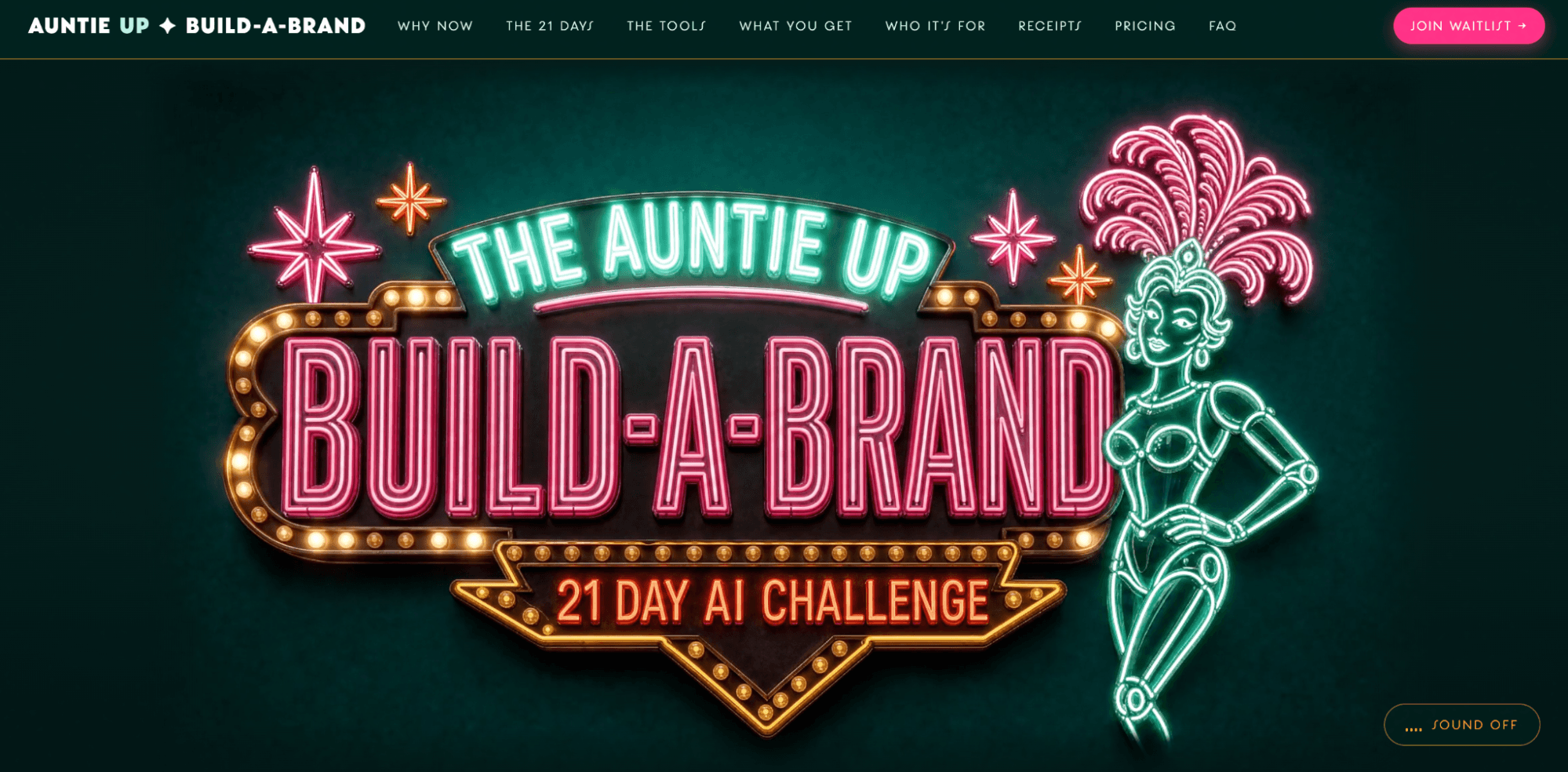
B2B marketers also benefit by escaping stock photography clichés. By maintaining strict reference parameters, businesses can construct entire digital ecosystems—such as custom sales pages, hero banners, and section illustrations—that share a unified aesthetic, color scheme, and visual world. This eliminates the need for expensive quarterly design shoots while keeping ad creative fresh across rapid six-week campaign cycles.
Official Guidelines: The Seven-Pillar Prompt Framework
To bridge the gap between creative intent and AI execution, deVane developed a Seven-Pillar Prompt Framework. Rather than acting as a rigid checklist, the framework serves as a creative control panel. Any dimension left unspecified forces the model to default to generic averages.
- Medium: Define the exact visual format (e.g., fine-art photography, 3D render, Sharpie line art, minimalist illustration).
- Subject and Action: Move beyond simple nouns. Instead of "a person," specify "a person looking into a mirror with a content expression." Instead of "a soda can," specify "a soda can dripping wet and balancing on its edge."
- Setting and Scene: Displace default backgrounds by adding granular details (e.g., swapping a generic "retro diner" for "a retro diner with dark wooden panels and glowing neon beer signs").
- Composition: Direct the framing—whether wide-angle, close-up, overhead, or minimalist asymmetric layout.
- Lighting: Specify mood through lighting mechanics (e.g., natural morning light filtering through linen curtains versus a single harsh corner lamp).
- Aesthetic and Vibe: Translate underlying stylistic appreciation (such as symmetric framing or saturated palettes) into descriptive language rather than simply naming artists.
- Intent: Leverage the LLM’s capacity to process emotional tone, directing the model on what feeling or action the viewer should experience.
Preparing Before Prompting: Taste, References, and Technical Hygiene
Effective AI generation begins long before opening an application. Marketers must cultivate the ability to articulate design taste. Because recognizing good design intuitively is distinct from describing its mechanics, creators can utilize custom AI skills (such as "taste accelerators") to break down reference images and identify successful lighting, angles, and color palettes.

Best Practices for Reference Inputs:
- Quality Over Quantity: For human subjects, one clear face photo and one full-body image are sufficient. Avoid uploading dozens of conflicting reference images.
- Branding and Logos: Smaller brands must upload high-resolution logos and explicitly instruct models not to alter them.
- Precise Color Codes: Avoid generic color descriptions. Provide exact hex values to maintain stringent corporate identity standards.
- Character Consistency: Request a character contact sheet (front, side, and full-body views in a single frame) to serve as a master reference for multi-angle campaigns.
- File Hygiene: Simple JPEG and PNG uploads are sufficient; complex vector conversions are unnecessary as long as the model can optically process the visual asset.
Implications: The Shift Toward Multi-Model Orchestration
As the industry matures, reliance on a single, isolated chatbot interface is giving way to multi-model ecosystems. Platforms like Magnific allow marketers to generate up to eight image variations simultaneously from a single prompt, drastically increasing the odds of finding usable assets in a medium where imperfection is common.
Furthermore, Model Context Protocol (MCP) integrations—such as connecting Claude directly to image generation backends—enable seamless workflows. Creators can operate entirely within a conversational interface where an AI acts simultaneously as a creative director, director of photography, and lighting specialist. Prompts are automatically formatted, images are generated, and assets can be integrated directly into web code or design software via plugins for Adobe Photoshop and Illustrator.
Key Takeaways for Marketers
- Stop Settling for Defaults: Generic prompts yield generic art. Specificity is the antidote to "AI slop."
- Build Reusable Templates: Create foundational prompt structures backed by exact hex codes and reference images to automate brand consistency.
- Adopt Multi-Model Tools: Leverage platforms that offer high-volume variations and side-by-side model comparisons to maximize creative control and efficiency.