In the ever-evolving landscape of digital marketing, capturing consumer attention requires more than just a single, isolated advertisement. While standard YouTube ad formats excel at driving broad impressions or immediate conversions, they often fail to tell a cohesive, multi-layered story. Enter Google Ads video sequence campaigns—a powerful yet underutilized tool that allows advertisers to display multiple video clips in a strictly predetermined order to individual viewers.
While other YouTube campaign types may utilize multiple videos, sequence campaigns are unique in their ability to enforce a rigid narrative progression. By guiding viewers through a carefully architected funnel of video content, brands can build powerful awareness, nurture consideration, and drive targeted engagement.
This comprehensive guide explores the mechanics of Google Ads video sequence campaigns, providing a step-by-step framework for campaign setup, sequence structuring, creative optimization, and performance analysis.
Main Facts: What Are Google Ads Video Sequence Campaigns?
At their core, video sequence campaigns are designed to deliver a series of ads to the same user in a specific, unbroken order. This format shines brightest when deployed for awareness and reach metrics, though its strategic applications stretch deep into the consideration and conversion phases of the marketing funnel.
Unlike standard video campaigns where Google’s algorithm optimizes for whichever asset it deems most likely to perform, sequence campaigns hand the control back to the advertiser. You dictate the exact path the consumer takes.
Key Structural Rules:
- The Ad Group Dynamic: Each step in a video sequence corresponds to an individual ad group. For instance, a four-step sequence translates directly to four distinct ad groups.
- Bidding Constraints: Advertisers running video sequences are restricted to Target CPM (tCPM) bidding. This ensures you pay based on impressions, which aligns with the brand-building and storytelling nature of the format.
- Frequency Capping: To prevent ad fatigue and banner blindness, Google requires strict frequency capping. Advertisers must limit how often an individual user can view the complete sequence, with available options set to once every 7 days or once every 30 days.
- Template Options: Google provides six distinct sequence-campaign templates, each tailored to a unique marketing objective, helping brands choose the right narrative framework out of the gate.
Chronology: A Step-by-Step Guide to Campaign Setup
Building a video ad sequence campaign requires navigating a specific path within the Google Ads interface. Because Google frequently updates its UI to push automated, simplified campaign types, certain manual options are hidden beneath non-standard pathways.

Step 1: Navigating the Initial Setup
To build a true video ad sequence, you must bypass Google’s automated recommendations.
- Log into your Google Ads account and initiate a new campaign.
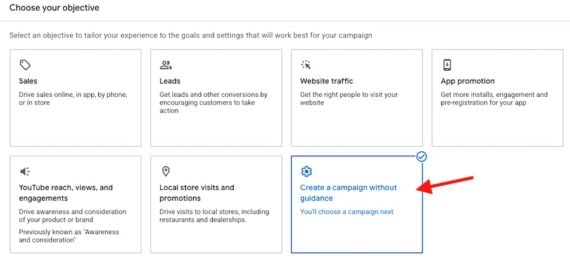
- Select “Create a campaign without guidance.” This is a critical first step; failing to do so will lock you out of the sequence feature.
- Choose “Video” as your campaign type.
- Important Note: If you select the broad “YouTube reach, views, and engagements” option, the ad sequence subtype will not appear.
Step 2: Selecting the Ad Sequence Subtype
Once you have designated the campaign type, choose the “Ad sequence” subtype. From here, you will configure your baseline campaign settings, including your target geographies, languages, budget allocations, and the mandatory target CPM bidding parameters and frequency caps.
Step 3: Structuring the Sequence Steps
With the campaign framework established, you must build out each individual step (ad group). Within each ad group, you will define:
- The specific video creative.
- The format (e.g., bumper ads, non-skippable ads, or true-view in-stream ads).
- Bidding details and targeting parameters.
For videos positioned at Step 2 and beyond, you must configure step transitions. Advertisers can choose from three primary transition triggers:
- Impression: The subsequent video triggers simply because the user was served an impression of the previous video.
- View: The next video fires only if the user watched the preceding video to completion (or past a certain threshold).
- Skip: The next video triggers if the user chose to skip the previous ad, allowing for dynamic re-engagement strategies.
By mixing and matching these triggers, brands can customize transitions to construct precise, responsive narratives. For example, if a user skips your introductory brand video, you can serve a completely different follow-up angle rather than doubling down on the same message.
Supporting Data & Creative Optimization: Leveraging Asset Studio
A great video sequence relies on high-quality, concise creative assets. Producing unique videos for every single step of a four-part campaign can quickly drain marketing budgets. Fortunately, digital marketers can leverage native tools like Google’s Asset Studio to optimize existing content.
Trimming and Repurposing Content
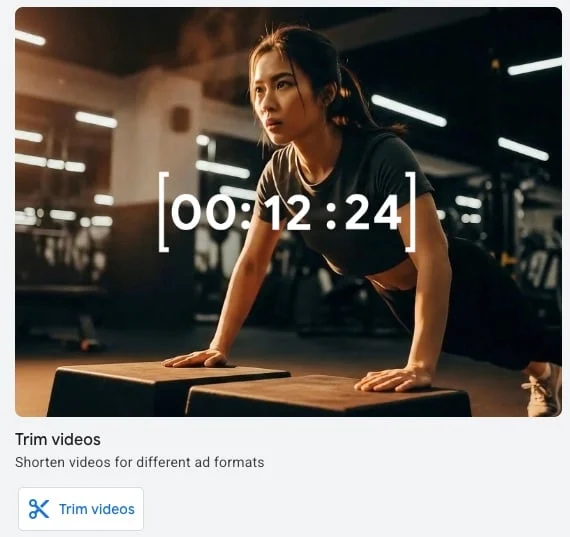
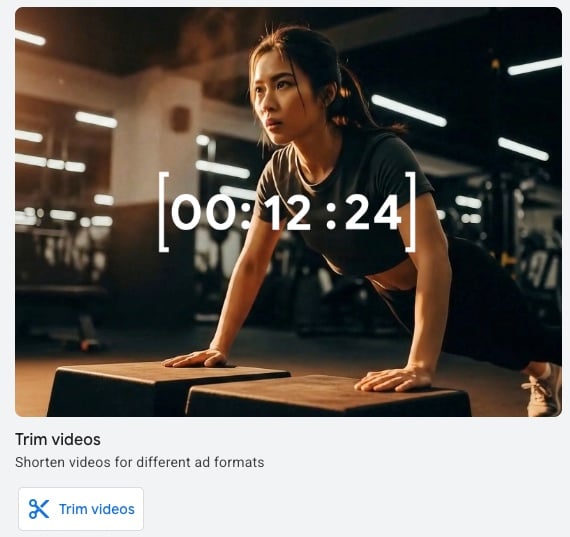
Asset Studio features a robust “Trim videos” utility that allows marketers to chop long-form videos into digestible, bite-sized clips suitable for sequencing. This tool seamlessly handles various video formats and durations.
For instance, consider a company like Yarbo, a manufacturer of advanced robotic lawn mowers. Instead of shooting four entirely separate commercials, Yarbo’s marketing team can take a single, comprehensive product demonstration video and slice it into modular components.
Practical Example 1: The "Introduce and Reinforce" Strategy
Using a two-step "Introduce and Reinforce" sequence, Yarbo can divide its demo video into two distinct parts:
- Video 1 (Introduction): Features the headline "Save Time." The Call to Action (CTA) reads "Learn more" and links directly to the brand’s homepage, allowing curious viewers to explore the product ecosystem.
- Video 2 (Reinforcement): Features the headline "Labor Day Sale." The CTA shifts to "Buy now" and directs traffic straight to the main product page to close the sale.
This structure allows the brand to test different headlines, creative hooks, and landing pages across various segments of their audience to identify what drives the highest-quality traffic.
Practical Example 2: The "Engage and Differentiate" Strategy
Alternatively, Yarbo could deploy a four-step sequence utilizing four distinct 15-second clips derived from the same master demo video. Each clip highlights a unique selling proposition (e.g., snow blowing, lawn mowing, leaf collection, and smart app integration), systematically educating the consumer on the versatility of the product over a series of touchpoints.
Official Responses and Industry Best Practices
While AI-generated video tools within Google Asset Studio are growing in popularity, industry veterans advise caution. Relying too heavily on successive AI-generated video clips can result in disjointed storytelling that feels sterile and unauthentic to the viewer. Human-directed narratives, real product demonstrations, and authentic voiceovers consistently outperform purely synthetic video sequences in long-term brand recall.
Furthermore, digital advertising experts emphasize the importance of pacing. A sequence that moves too quickly can overwhelm the consumer, while one that spaces out steps over too many days risks losing the viewer’s train of thought before the narrative concludes.
Implications: Interpreting Results and Measuring Success
Because video ad sequence campaigns are fundamentally designed to generate demand, build brand equity, and drive deep engagement, traditional last-click attribution models fail to capture their true value. Marketers must evaluate performance through a specialized lens.
Google provides distinct metrics tailored specifically to sequence campaigns:
- Sequence Completion Rate: The percentage of users who start at step one and successfully make it through the final video in your sequence. This is the ultimate health metric for your narrative structure.
- Drop-off Rates Between Steps: Identifying where users abandon the sequence is crucial. If 90% of viewers watch Step 1 but only 10% proceed to Step 2, your transition triggers or creative hooks require immediate optimization.
- Engagement and View-Through Rates: Measuring how deeply audiences interact with individual components of the campaign.
While tracking standard downstream actions like clicks and website conversions remains important, the primary objective of a video sequence is qualitative engagement. As marketing strategist Matthew Umbro notes, if only 10% of your audience watches 100% of a critical video asset, the creative or the pacing clearly requires refinement.
Final Thoughts
Google Ads video sequence campaigns represent the pinnacle of digital video storytelling, bridging the gap between mass-reach television advertising and hyper-targeted digital media. By mastering the campaign setup, leveraging tools like Asset Studio to repurpose content creatively, and vigilantly monitoring drop-off metrics, brands can transform casual YouTube scrollers into deeply engaged brand advocates.