
By the Business & Technology Editorial Desk
Published: Insights & Strategy

Main Facts: The Renaissance of the Pixelated Square
Quick Response (QR) codes have quietly transitioned from a pandemic-era utility into a permanent fixtures of the global commercial landscape. Today, these matrix barcodes are ubiquitous, bridging the physical and digital realms across virtually every consumer touchpoint—from restaurant e-menus and virtual business cards to airport boarding passes and post-delivery feedback terminals.

However, according to industry expert Stanislav Khrustalev, businesses frequently treat QR codes as an afterthought rather than a critical UX (User Experience) touchpoint. While the public is more technologically literate and ready to scan than ever before, poor implementation can instantly transform a promising engagement channel into a frustrating roadblock.

To help businesses navigate these pitfalls, experts have curated a comprehensive operational checklist. Broken down across the chronological stages of the customer journey—ranging from physical placement and code visibility to digital routing and analytics—this guide establishes the foundational rules for maximizing conversion and preserving consumer goodwill.

Chronology: The Evolution of the QR Code Journey
Understanding how to deploy a QR code effectively requires mapping the exact chronological sequence a customer undertakes. The lifecycle of a scan can be broken down into four distinct phases:

- The Approach & Usage: The customer encounters the brand in the physical world (e.g., a delivery van, a retail counter, or an outdoor billboard) and recognizes the utility of scanning over typing a manual URL.
- The Visual Examination: The customer notices the code. They process the accompanying Call to Action (CTA), evaluate its perceived value, and decide whether the scan is worth their time.
- The Physical Interaction: The consumer extracts their smartphone, aims the native camera, and attempts to scan the code under prevailing environmental conditions (lighting, distance, surface friction, and network availability).
- The Digital Landing: The browser opens the link. The user navigates a mobile-optimized landing page, completes the desired action (such as downloading an app, tipping a server, or leaving feedback), and exits the ecosystem.
Failing at any single step in this chronological sequence breaks the continuity of the interaction, often resulting in immediate abandonment.
Supporting Data & Real-World Case Studies: Best Practices vs. UX Pitfalls
To understand what constitutes good and bad implementation, Khrustalev contrasts several real-world examples from global retail, shipping, and hospitality brands.

1. The Physical Placement Paradox
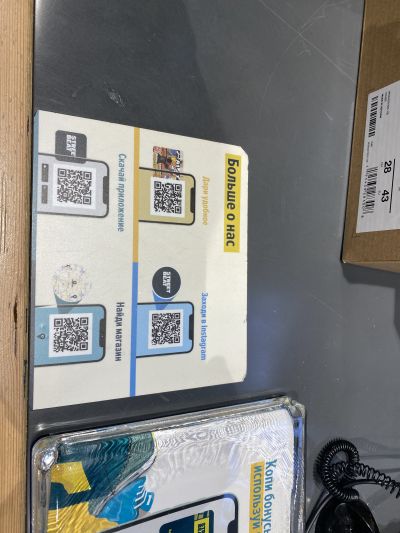
Visibility is paramount. Codes placed outside of natural eye lines or on dynamic, high-traffic surfaces—such as the checkout counter at sportswear retailer Street Beat—risk rapid wear and tear. Over time, friction peels away the sticker, degrading the brand’s aesthetic and rendering the code unscannable. Conversely, placing a code inside a storefront window protects it from physical erosion, though transparent glass introduces its own optical challenges.

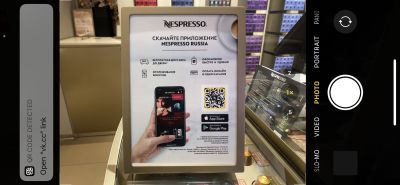
For instance, Nespresso boutiques infamously faced issues where transparent storefront glass made their promotional QR codes completely unreadable by standard smartphone cameras. Store personnel were forced to resort to holding up sheets of physical paper behind the glass—an inefficient and awkward workaround that degrades the premium brand experience.
2. Reducing Friction Through Deep Linking
A common mistake businesses make is overwhelming consumers with too many choices. Coffeemania, a restaurant chain, previously utilized multiple separate QR codes on tables—one for customer reviews and another for tipping staff. Even worse, their loyalty program forced users to navigate multiple codes depending on how they wished to register.

In contrast, retailers like Uniqlo streamline the process using deep linking. By embedding intelligent routing into a single QR code, the system automatically detects whether the user is holding an iPhone or an Android device. Scanning the exact same code routes iOS users straight to the App Store and Android users to Google Play, eliminating cognitive overload and drastically accelerating conversion rates.

3. Native App Traps vs. Universal Accessibility
Brands must carefully evaluate how a code is read. When retail giant Auchan launched its "Scan & Pay" initiative, they blanketed stores with QR codes that required a specialized in-app camera to read. Hundreds of shoppers attempted to use their native smartphone cameras, only to encounter error screens or raw system codes. A successful rollout anticipates the customer’s default behavior: always rely on native camera applications unless a proprietary app environment is absolutely mandatory.

Official Insights & Strategic Recommendations
Drawing from field observations, industry leaders recommend adherence to specific foundational principles when integrating QR codes into physical or digital collateral:

- Clarity of Value: Never display a naked QR code. Pair it with an explicit Call to Action (e.g., "Scan to download our app") and a brief explanation of the value proposition (e.g., "Unlock 10% off your first order").
- Contrast and Resolution: Maintain a strict dark-on-light color palette. While branding codes with company colors or central logos looks professional, ensure the contrast against the background remains high enough for low-light environments and older smartphone models.
- Consolidated Landing Pages: If multiple actions are required, route users to a single, mobile-optimized landing page featuring clean CTAs rather than forcing users to juggle multiple physical codes.
- Dynamic Analytics via UTM Parameters: Leverage tracking parameters within your URLs. By attaching unique IDs to codes printed on different city billboards, marketing teams can accurately measure offline-to-online conversion metrics and optimize future outdoor advertising spend.
Implications: The High Cost of Poor Execution
As physical and digital spaces continue to merge, the QR code has evolved from a novelty into an expectation. However, convenience is fragile. When a business implements a QR code that leads to a broken link, requires an unoptimized desktop webpage, or sits on an unlit billboard along a highway, it communicates carelessness to the consumer.

The implications are clear: while a well-executed QR code frictionless-ly accelerates the customer journey, a poorly planned execution actively damages brand equity. Businesses must treat matrix barcodes not merely as graphic design elements, but as vital technical touchpoints that require rigorous testing, continuous maintenance, and a relentless focus on user experience.