In the fast-paced world of digital marketing, performance anomalies demand immediate answers. When a high-priority product page slips in the search engine results pages (SERPs), a competitor unexpectedly outranks your primary content, or a client site struggles with low conversion rates, traditional site-wide audits can feel unnecessarily cumbersome.
Digital marketers and SEO professionals frequently face scenarios where a full site crawl is impractical for immediate triage. To bridge this gap, powerful browser-based diagnostic tools have emerged as essential assets. Among them, Semrush’s free SEOquake Chrome extension stands out by offering instantaneous, on-page technical signaling, structural analysis, and core metric evaluation directly within the browser window.
This comprehensive guide breaks down a structured, three-minute diagnostic workflow using SEOquake, taking you from initial triage to deep technical diagnosis without ever leaving the page.
What Is SEOquake? The Anatomy of a Browser-Based Audit Tool
Developed by Semrush, SEOquake is a robust, free Chrome extension engineered to evaluate any webpage in real time. Rather than forcing users to wait for a comprehensive site crawler to process thousands of URLs, SEOquake installs directly into your browser toolbar. A single click on the extension icon initiates a rapid analysis of technical signals, on-page SEO factors, linking strategies, and core Semrush visibility metrics.

The extension provides two primary modes of interaction:
- The Quick View Pop-Up: Designed for rapid, 60-second triage to flag glaring structural or technical errors.
- The Full Report Panel: Built for deeper investigation, providing granular data across six distinct analytical categories.
Throughout every report, SEOquake employs an intuitive color-coded system that allows professionals to instantly spot healthy components, assess minor warnings, and prioritize critical fixes. Green typically indicates optimal implementation, orange signals a warning requiring professional judgment, and red highlights critical issues that demand immediate remediation.

Minute One: Triage Page-Level Anomalies via the Quick View Pop-Up
Triage forms the foundation of the three-minute audit workflow. Within 60 seconds or fewer, the objective is to answer a singular question: Is there an obvious impediment preventing this page from performing?
The Quick View pop-up is organized into five distinct tabs. For a rapid assessment of an underperforming product page—such as an e-commerce listing for UnderFit undershirts—the workflow concentrates on three primary sections, spending approximately 20 seconds per tab: Page Info, Audit, and Content.

1. Evaluating Core SEO Elements via Page Info
The Page Info tab serves as the optimal starting point, providing a high-level overview of foundational on-page SEO elements. When assessing a URL, a professional prioritizes five core components:
- Title tag length and exact-match keyword placement.
- Meta description relevance and character count.
- Canonical tag configuration.
- HTTP status codes (ensuring a 200 OK response).
- Indexability status (checking for accidental
noindextags).
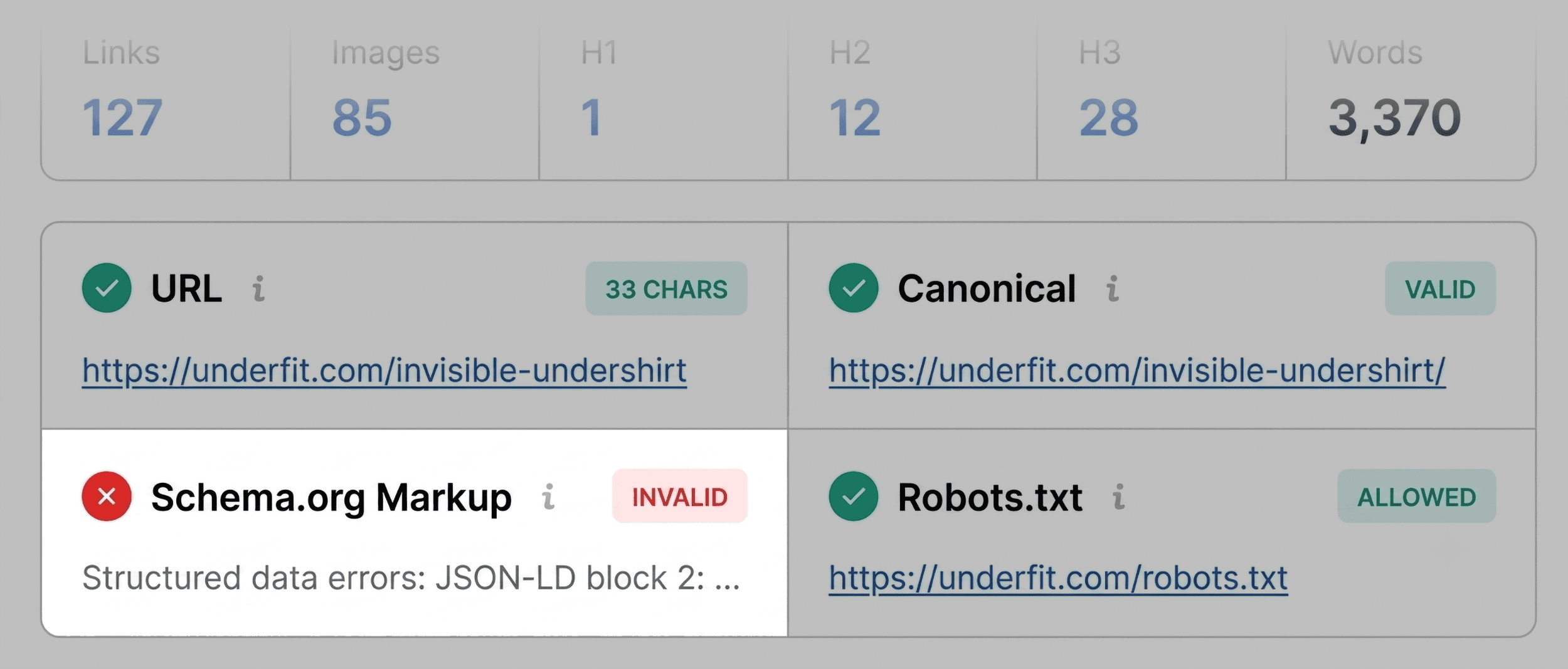
During an audit of the UnderFit product page, SEOquake instantly flags the Schema.org markup in red. Further inspection reveals JSON-LD parsing errors. For an e-commerce product page, invalid structured data is a critical concern, as it renders the URL ineligible for valuable product rich results—such as dynamic pricing, stock availability, and aggregate star ratings—directly in the SERPs. This immediately lands on the priority list for the Full Report phase.

Other elements, such as minor title length variations, are noted as non-blockers but recorded for subsequent optimization.
2. Scanning the Audit Tab for Technical Problems
Moving to the Audit tab uncovers technical SEO essentials that may not surface immediately in basic page info summaries. This section checks for mobile responsiveness, viewport settings, SSL certificate implementation, and robots.txt directives.

While many metrics display in green or orange (signifying warnings rather than emergencies), orange flags require an experienced digital marketer’s judgment. For instance, a warning regarding missing or misconfigured hreflang tags must be evaluated against the site’s global architecture. If the brand operates solely in a single domestic market, international targeting warnings can be deprioritized; however, for multi-regional e-commerce platforms, they represent critical localization failures.
3. Reviewing Content Structure and Headings
Content architecture significantly influences both human user experience and the ability of search engine crawlers and AI-driven retrieval systems to parse topical relevance.

In the Content tab, auditors analyze heading distribution (H1 through H6) and image optimization metrics. An analysis of the UnderFit product page reveals structural irregularities: the primary H1 tag appears deep within the page layout, and the heading hierarchy jumps erratically—moving directly from an H1 to an H4. Such structural inconsistencies hinder accessibility and weaken topical clarity.
Additionally, the image summary flags that 36 images lack alternative text. Because high-resolution imagery drives e-commerce conversions, missing alt text not only diminishes accessibility compliance for visually impaired shoppers but also deprives search engines of crucial contextual data for image search rankings.

Minutes Two and Three: Diagnosing Root Causes via the Full Report
Having gathered initial flags during the 60-second triage phase, the subsequent two minutes are dedicated to diagnosing root causes through SEOquake’s Full Report. Clicking “View Full Report” opens an expanded suite comprising six specialized analytical panels: Overview, Diagnostics, Internal Links, External Links, Density, and Semrush.
Deep-Dive Analysis in the Full Audit Panel
The full Audit panel covers crawlability, indexation rules, mobile compliance, sitemap status, and schema validation. By utilizing the internal navigation menu, auditors can bypass endless scrolling and jump straight to flagged items.

For the UnderFit audit, investigating the XML sitemap warning reveals that while https://underfit.com/sitemap.xml exists, it is not robustly linked or declared in ways that facilitate optimal crawler discovery.
Next, addressing the schema markup error involves clicking “Test in Rich Results,” which automatically transitions the data to Google’s official Rich Results Test tool. The test detects three invalid items within the structured data code, confirming the initial triage warning and cementing the issue onto the developer fix list.

Uncovering Topic Coverage Gaps via Keyword Density
When a page underperforms despite clean technical execution, analyzing keyword density provides insight into topical relevance and potential content gaps.
SEOquake generates a visual Keyword Cloud and detailed tables breaking down one-word, two-word, and three-word phrases. For the UnderFit page, core product terms—such as undershirt, fit, fabric, v-neck, and cotton—dominate the cloud, aligning perfectly with expected e-commerce terminology.

The “Found in” column verifies that primary keywords appear in high-value locations: undershirt populates the meta description and H1, while fit and underfit anchor the title tag. Although multi-word phrase tables occasionally capture anomalous interface text (such as interface buttons or script-driven terms like “zoom zoom”), the core thematic signals remain strong and coherent.
Inspecting Link Health and Broken Pathways
Broken or ambiguous hyperlinks degrade user experience and disrupt crawl paths. The Links panel inventories all internal and external hyperlinks, classifying them by response codes, anchor text, and dofollow/nofollow attributes.

The UnderFit report flags one broken internal link alongside 37 broken external links. Drilling down into the external links table reveals that many are JavaScript-dependent elements or dynamic widget calls rather than standard editorial links. However, verifying their functionality remains imperative to prevent wasted crawl budget and ensure frictionless user navigation.
Leveraging Semrush Metrics for Strategic Context
Before finalizing recommendations, a critical decision must be made: Is the identified issue isolated to this specific URL, or is it symptomatic of a broader, site-wide infrastructure problem?

The integrated Semrush panel provides vital context by displaying domain-level and page-level authority metrics, including organic search traffic estimates, keyword counts, domain score, and backlink profiles. When connected to a full Semrush user account, the tool unlocks advanced traffic analytics and historical engagement metrics.
A weak-performing page residing on a domain with high authority, robust traffic, and a strong backlink profile typically points to an isolated content or page-level error. Conversely, structural issues like XML sitemap misconfigurations, global template schema errors, or sitewide broken JavaScript links indicate macro-level technical debt.

When macro-level issues are suspected, relying solely on page-level extensions is insufficient. Professionals must escalate the investigation to a comprehensive crawl utilizing platforms like Semrush Site Audit to scan hundreds of URLs simultaneously.
Implications for Modern SEO Strategy
The integration of browser-based tools like SEOquake into everyday digital marketing workflows redefines how professionals approach on-page optimization. By compressing initial technical triage into a three-minute window, SEOs can drastically reduce diagnostic latency.

Key Takeaways:
- Speed Meets Precision: Quick-view overlays allow marketers to surface critical schema errors, missing alt attributes, and structural heading flaws instantly without waiting for scheduled site crawlers.
- Contextual Diagnosis: Combining on-page metrics with domain-level Semrush data ensures that teams correctly differentiate between isolated page issues and systemic, site-wide architectural failures.
- Actionable Roadmaps: Exporting link inventories and audit findings directly into CSV formats accelerates developer handoffs and remediation workflows.
As search engine algorithms and AI-driven discovery engines increasingly prioritize technical hygiene, structured data accuracy, and topical clarity, rapid diagnostic capabilities will remain a cornerstone of successful digital marketing operations.
Conclusion and Next Steps
Auditing a webpage no longer requires hours of manual code inspection or waiting for lengthy crawler queues. As demonstrated through the UnderFit product page analysis, the SEOquake Chrome extension empowers marketers to triage, diagnose, and categorize page-level health in three minutes flat.

To begin optimizing your own digital properties:
- Install the SEOquake extension from the Chrome Web Store.
- Navigate to any target URL and launch the Quick View pop-up to conduct your initial 60-second triage.
- Drill down into the Full Report panels to investigate schema validity, content structure, and keyword density.
- Scale your insights by connecting your Semrush account or initiating a comprehensive site-wide audit for broader architectural oversight.
Disclaimer: Backlinko is owned by Semrush. The insights provided reflect hands-on SEO methodologies and industry expertise.