The landscape of software development is undergoing a seismic shift. For decades, the ability to build custom automations and software tools was gated behind years of rigorous study in computer science and syntax mastery. Today, that barrier is dissolving. With the emergence of agentic AI tools like Anthropic’s Claude Code, the power to build is moving from the hands of professional developers into the hands of anyone with a clear idea and the ability to communicate in natural language.
As AI educator Tyler Reed notes, the most common misconception in the industry is that one must "know how to code" to leverage the power of AI. The reality, he argues, is that current models have reached a level of sophistication where a coding background is no longer a prerequisite. In fact, some of the most prolific creators in the AI automation space have never written a single line of traditional code. Claude Code acts as a bridge, transforming intent into execution.
The Core Concept: What is Claude Code?
Claude Code is an agentic AI tool—a command-line interface (CLI) application that functions as an autonomous partner. Unlike standard chatbots that simply provide snippets of text or code blocks for you to copy and paste, Claude Code actively interacts with your local computer environment.
It handles the heavy lifting: it conducts research, writes the necessary code, establishes secure connections between third-party applications, and executes the tasks you assign it. Before the arrival of such tools, creating a simple integration—such as syncing your Gmail with your calendar—often required hours of navigating complex API documentation, managing secret keys, and troubleshooting cryptic errors on forums like Stack Overflow. Claude Code streamlines this by identifying the technical path required to reach your desired outcome and walking you through the implementation.
Prerequisites: Preparing for Deployment
Before diving into the terminal, there are two fundamental realities every user must understand to ensure a smooth experience.
1. The Subscription Requirement
To use Claude Code with any meaningful impact, a paid Anthropic subscription is necessary. If you already maintain a paid Claude account, you are set; the tool integrates directly with your existing plan. For those who are not yet subscribers, the $20/month Pro subscription provides the necessary access to the models required for complex agentic tasks.
2. The Terminal Environment
Claude Code is a command-line interface tool. This means you will interact with it through your computer’s terminal—a text-based window that serves as the command center for your operating system. Whether you are using macOS, Windows, or Linux, the experience is text-centric. While the "black screen" interface can be intimidating for those accustomed to graphical user interfaces (GUIs), the process is remarkably logical and user-friendly once initialized.
A Note on Safety: Transparency is baked into the tool’s design. By default, Claude Code will request your explicit permission before taking any action that modifies your system, such as browsing the web, creating new files, or editing existing documents. You maintain total control over its agency.
Step-by-Step Implementation: Getting Started
The process of moving from installation to your first automation involves a structured, straightforward sequence of events.
The Installation Sequence
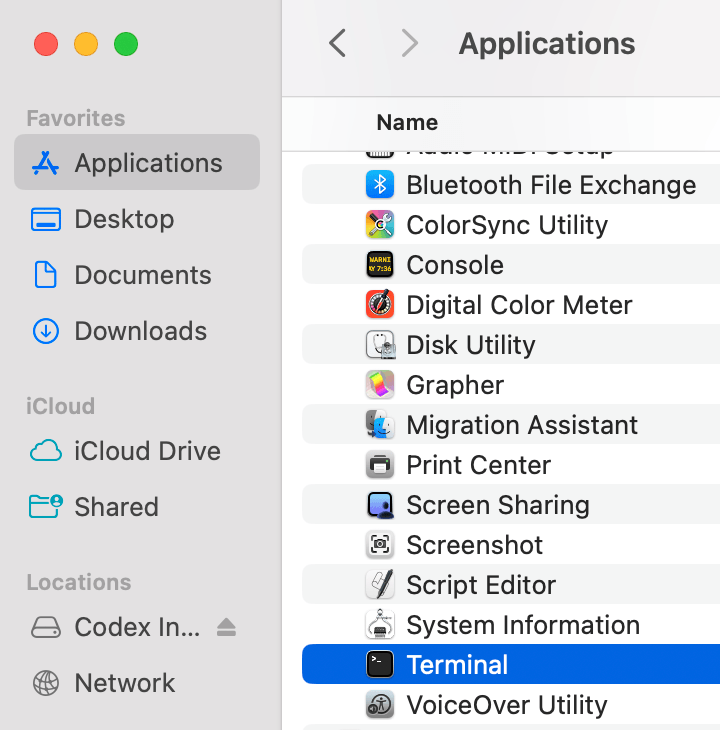
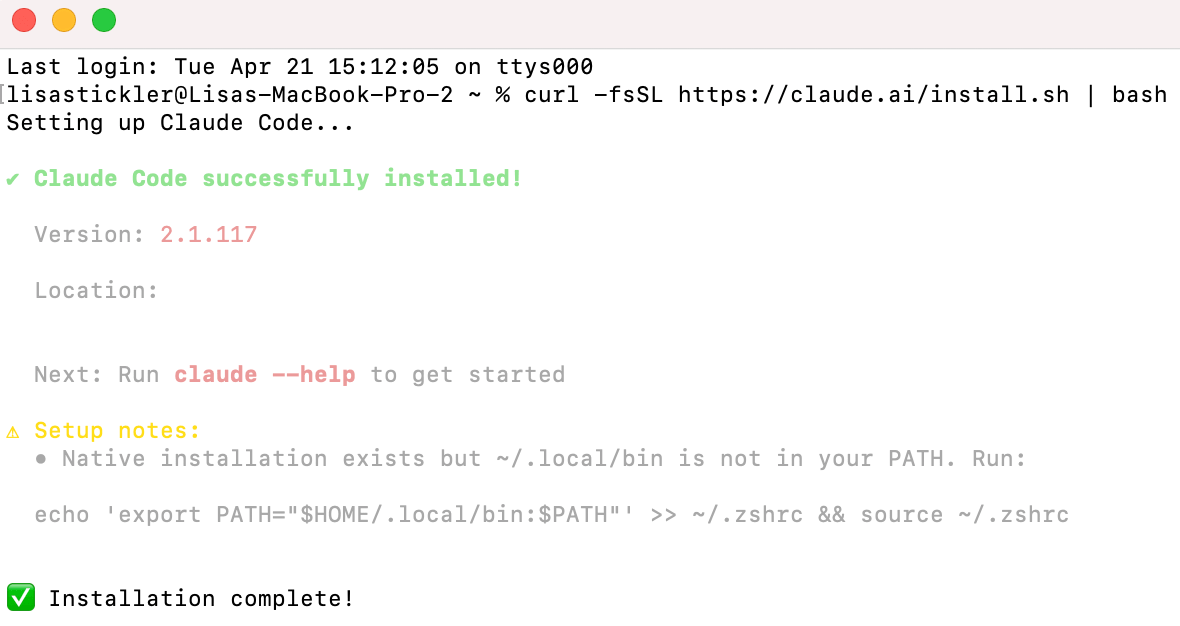
- Launch the Terminal: Open your computer’s command-line interface.
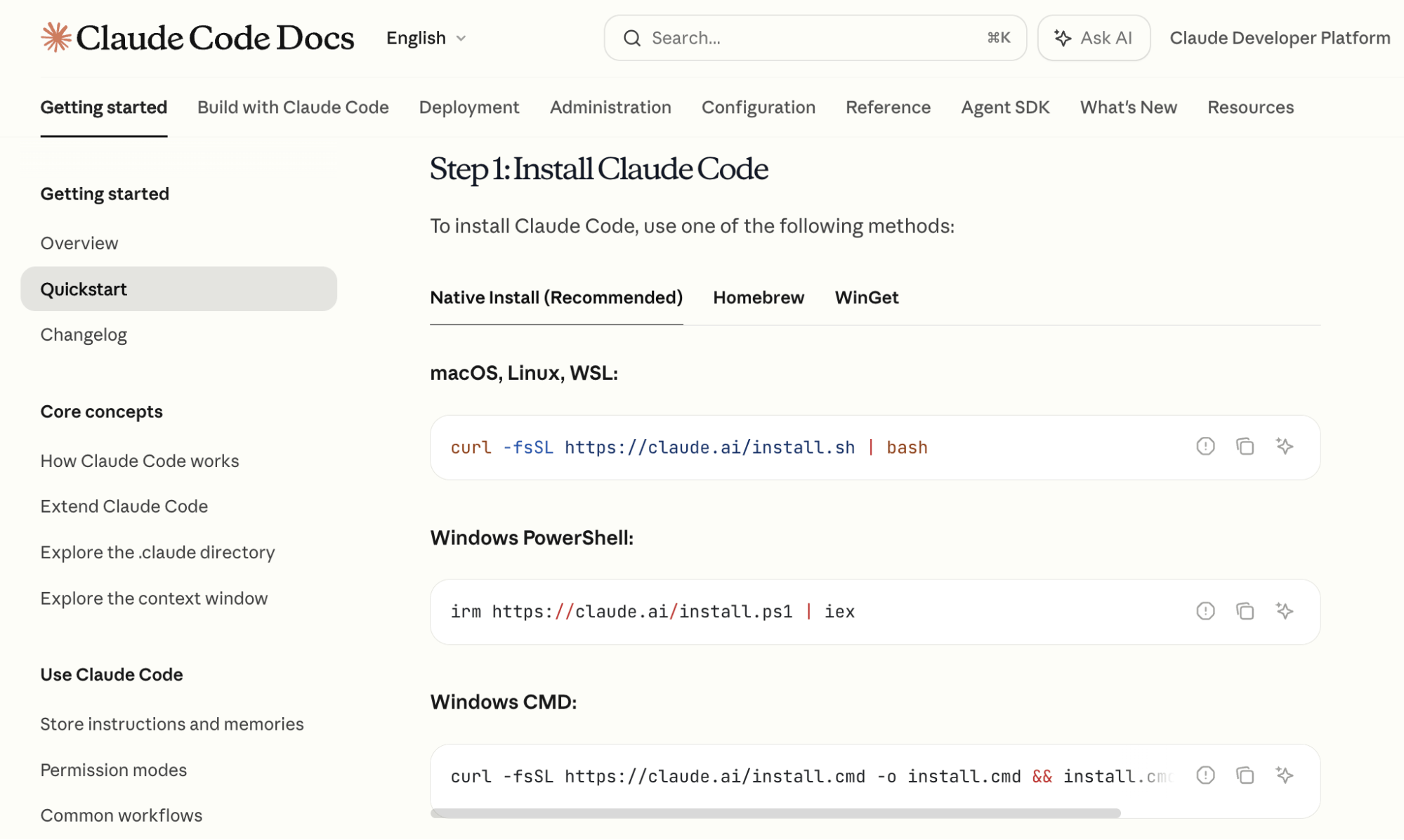
- Consult Documentation: Visit the official Anthropic terminal guide. You will find clear, copy-and-paste commands tailored to your operating system.
- Execution: Paste the command into your terminal and press Enter. The tool will handle the installation process automatically.
- Authentication: Once the confirmation message appears, type
claudeto initiate the program. This will trigger a browser-based authentication step where you log in with your Claude-associated email address.
Mastery: Navigating the Terminal and Managing Context
Once inside the interface, you will rely on "slash commands" to manage your workflow. Proficiency with these commands is what separates a novice user from a power user.
Model Selection Strategy
Type /model to view the available models. Tyler Reed suggests a two-step approach to model selection:
- The Planning Phase: Utilize the Opus model. Its superior reasoning capabilities and expansive context window make it ideal for architectural planning and outlining project structures.
- The Execution Phase: Once the roadmap is established, switch to the latest version of Sonnet. It offers an optimal balance of high-speed performance and token efficiency, making it the workhorse for coding and implementation.
Managing the Context Window
As your session grows, you may notice the context window—the "short-term memory" of your AI—nearing capacity. You can track this in the bottom-right corner of the terminal. To refresh your workspace without losing progress, use the /compact command. This creates a summarized "state of the union" for your project, allowing the AI to continue the work with a clear, condensed history.

Advanced Productivity Features
As you become more comfortable, two features will dramatically expand your capabilities: Custom Skills and Persistent Markdown Files.
Custom Skills
A custom skill is essentially a reusable package of instructions. If you perform a repetitive task, you can ask Claude Code to "Create a skill from this task." By providing a detailed prompt—for instance, a request to research competitor YouTube channels, extract video data, and download audio—Claude Code saves these instructions as a markdown file. You can then trigger the entire, multi-step process with a single custom slash command.
CLAUDE.md Files
Tyler Reed emphasizes the importance of the CLAUDE.md file, which is initialized via the /init command. This file acts as the project’s "persistent memory." It tracks what the project does, what has already been built, and what remains in progress. Every time you return to a project folder, the AI reads this file first, ensuring it understands the history and scope of the work immediately.
Case Study: Building Your First Automation
To put these skills to the test, consider the project of connecting your Google Calendar to a Telegram bot for daily schedule briefings.
Phase 1: Google Calendar Integration
Open your terminal and instruct Claude: "I want to have access to my Google Calendar. Tell me how to do this." If the technical steps (like obtaining API credentials) feel overwhelming, append the phrase "Explain like I’m five." Claude Code will guide you through the OAuth authentication process, which authorizes the AI to read your schedule securely.
Phase 2: Telegram Bot Configuration
Type /telegram within the terminal. The tool will walk you through the configuration of a Telegram bot—a specialized account that serves as your communication bridge. Once set up, this bot becomes the endpoint that pushes information directly to your phone.
Phase 3: The Automation Loop
Once the connections are established, execute your final command: "Read my Google Calendar and send me a Telegram message every morning with a summary of the next day’s schedule."
Claude Code will then script the interaction, tying the two services together. As long as the terminal session remains active, the AI will autonomously poll your calendar and deliver your briefing each morning, keeping you organized without the need to manually open apps.
Implications for the Future of Work
The rise of tools like Claude Code signals a profound shift in the professional landscape. We are entering an era where "technical debt" is no longer the primary hurdle for entrepreneurs and creators. By lowering the cost and complexity of building custom software, these tools empower individuals to prototype, iterate, and launch ideas in hours rather than weeks.
While the terminal may appear intimidating to the uninitiated, it is merely the interface for a new type of cognitive labor. The future belongs to those who learn to bridge the gap between human intent and machine execution. As Tyler Reed suggests, the ultimate skill in this new economy is not the syntax of a programming language, but the clarity of your instructions and the structure of your strategy. By mastering Claude Code, you are not just learning a new tool; you are gaining the ability to turn any digital idea into an automated reality.