In the modern digital landscape, the way users interact with data—whether through product catalogs, social media feeds, or complex order management systems—is a defining factor of the user experience (UX). As designers and developers, we are constantly tasked with helping users explore vast quantities of information efficiently. For years, the industry has been locked in a tug-of-war between two dominant paradigms: the structured, predictable nature of pagination and the rapid, immersive flow of infinite scroll.
While infinite scroll promises a frictionless browsing experience, it is frequently criticized for creating an "information abyss" that leaves users feeling disoriented and overwhelmed. This article explores how to bridge the gap, leveraging the benefits of both patterns to create a more robust, accessible, and user-friendly interface.
The Core Problem: Why Infinite Scroll Often Fails
The debate surrounding infinite scroll is not merely aesthetic; it is deeply rooted in human cognitive load and technical feasibility. When a user is presented with an endless stream of content, several critical usability issues emerge:
- The Loss of Orientation: Unlike a book or a paginated interface, infinite scroll lacks a clear beginning, middle, and end. Users struggle to track their progress, leading to a sense of being lost in a stream where "new" and "old" content blend together.
- The Footer Dilemma: The footer of a website often contains essential links—contact information, legal policies, and secondary navigation. In an infinite scroll environment, these elements become "moving targets." Users often find themselves in a futile race to reach the footer before the next batch of content is automatically appended, effectively pushing the footer further down the page.
- Broken Expectations: The scrollbar is a visual promise of page length. With infinite scroll, that promise is constantly broken. As new items load, the scrollbar shrinks, forcing the user to mentally recalibrate their position, which is both jarring and disorienting.
- Accessibility and Technical Debt: Screen readers often struggle to announce newly loaded content, creating a significant barrier for users with disabilities. Furthermore, for users on unstable internet connections, the constant demand for data fetching can lead to performance degradation and page "stuttering."
The Case for Pagination: The Reliable Alternative
For many years, pagination has been the "old reliable" of web design. By breaking content into discrete segments, it provides a sense of accomplishment and clear boundaries.
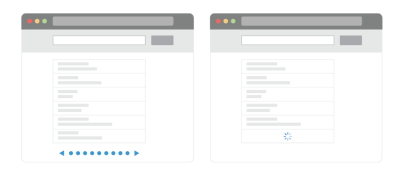
Benefits of the Paginated Approach
- Clear Milestones: Users know exactly how much content remains, providing a sense of completion.
- Predictability: The URL updates with each page, allowing users to bookmark their exact location, share specific results with others, or return to a previously viewed set of items without starting over.
- Enhanced Control: Users can jump to specific pages, effectively managing the "information load" by choosing how many items to process at a time.
However, usability testing has shown that pagination can also have its drawbacks. It is often perceived as "slow," and users frequently exhibit lower engagement levels when they are forced to stop and click a button to view more content. The friction of the "click-to-load" cycle can lead to fewer items viewed and a higher abandonment rate.
The Hybrid Evolution: "Load More" and Dynamic Pagination
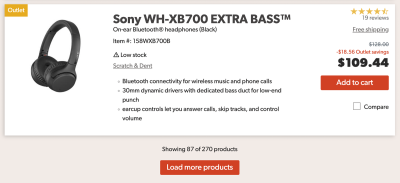
To capture the best of both worlds, many high-performing e-commerce sites and data-heavy applications have adopted a hybrid approach. The "Load More" pattern is the primary contender here.
Implementing a Tiered Strategy
Rather than forcing a binary choice, designers can implement a tiered loading strategy:
- Initial Load: Display a substantial amount of content (e.g., 30 items on desktop, 10 on mobile) to provide immediate gratification.
- Automatic Fetching: For the first few scrolls, allow content to load automatically to maintain momentum.
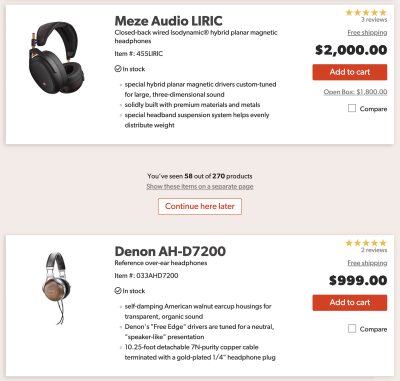
- The Threshold Shift: After a certain threshold—say, 70 items—switch to a "Load More" button. This forces a deliberate pause, allowing the user to reach the footer, take a breath, and decide whether they want to continue their search.
Strategies for Modernizing Infinite Scroll
If your project demands the speed of infinite scroll, you can mitigate its inherent risks by implementing specific UX refinements. These strategies transform the "abyss" into a navigable experience.
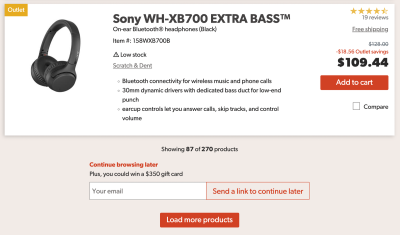
1. Visual Anchoring and Bookmarking
Break the endless stream by adding whitespace or visual separators between batches of content. Furthermore, provide a "Continue here later" feature. This can be as simple as a UI element that allows the user to copy a deep link to their current position or a modal that captures their email address to send a reminder link.
2. The "Footer Reveal"
To ensure the footer remains accessible, designers can implement a "footer reveal" pattern. Instead of letting the footer drift into infinity, use a persistent, sticky bottom bar or a dedicated trigger that allows the user to expand the footer on demand, regardless of how much content has been loaded.
3. Dynamic Pagination
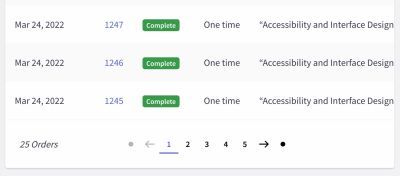
Some platforms have mastered the art of "dynamic pagination." As the user scrolls, the page number updates in a sticky bottom bar, and the URL parameters adjust in real-time. This provides the speed of infinite scroll with the technical benefits of traditional pagination, including the ability to jump to specific pages via a drop-down menu.
4. Scrollbar Intelligence
Baymard Institute and other UX research firms suggest making the scrollbar more informative. By adding dynamic labels to the scrollbar track—such as price ranges or category headers—users can see exactly where they are in the list. As the user drags the scrollbar, these labels act as a "mini-map," providing context for the content they are about to land on.
Implications for Design and Performance
Implementing these features is not a trivial task; it requires a deep commitment to performance and accessibility.
- Keyboard Accessibility: Every "Load More" button and "Footer Reveal" must be fully functional via keyboard shortcuts. Users should not be dependent solely on a mouse or touch input.
- SEO Considerations: If you use infinite scroll, ensure that search engine crawlers can index the content. This typically involves providing a static paginated version of the site for crawlers while delivering the dynamic, infinite version to human users.
- Performance Budgeting: Endless scrolling can quickly bloat a page’s DOM (Document Object Model). Developers must implement smart "virtualization," where only the items currently in the viewport (and a small buffer) are rendered in the browser, with elements being removed as they scroll off-screen to keep the browser responsive.
Conclusion: Is Infinite Scroll Right for You?
The "infinite scroll vs. pagination" debate is rarely about choosing one over the other; it is about choosing the right tool for the user’s intent.

If your platform is designed for comparison, discovery, and high-intensity data management, the traditional structure of pagination—or a hybrid approach—is likely the superior choice. If your goal is entertainment, fast-paced exploration, or content consumption, an optimized, user-controlled infinite scroll can be highly effective.
Ultimately, the best design is one that empowers the user. By providing clear indicators, accessible navigation, and the ability to "pause" the flow, you can create an experience that feels fast without being overwhelming. As we look toward the future of interface design, the goal remains the same: ensuring that the technology stays invisible, allowing the user to focus entirely on the content they came to find.

For those looking to deepen their expertise, platforms like the "Smart Interface Design Patterns" course provide a comprehensive look at these challenges, offering actionable, real-world solutions that move beyond simple theory into the realm of professional execution.