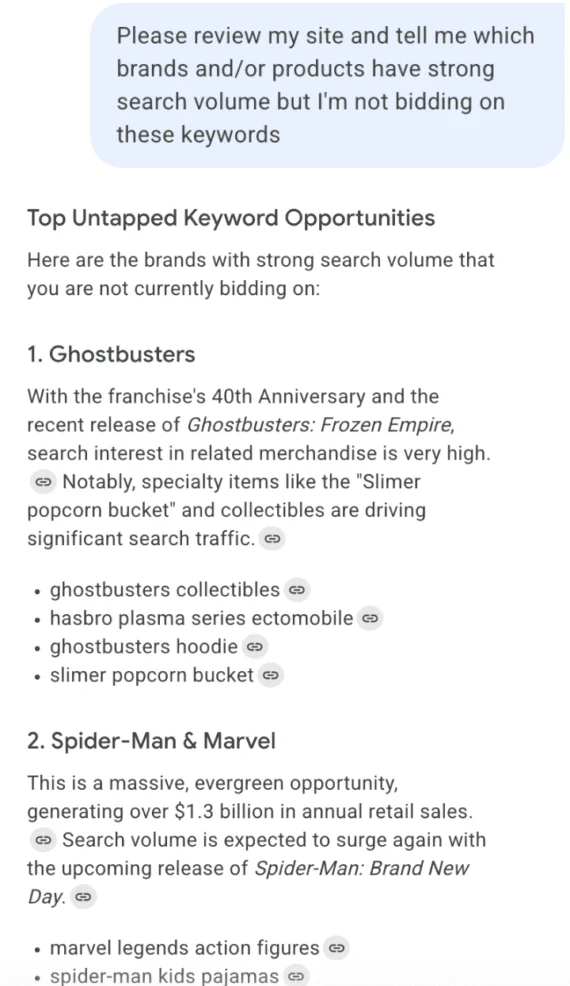
In the rapidly evolving landscape of digital marketing, the line between traditional search engine traffic and generative AI-driven referral traffic has become increasingly blurred. As users shift their search habits from standard search engine results pages (SERPs) to sophisticated chatbot interfaces, marketers have been left in the dark, struggling to quantify how much of their traffic originates from large language models (LLMs).
To address this, Google Analytics 4 (GA4) introduced its "AI Assistant" channel in May. This development represents a seismic shift in how we measure digital engagement, offering a dedicated lens through which site owners can view the influx of traffic from platforms like ChatGPT, Gemini, and Claude.
The Genesis of the AI Assistant Channel
For the past year, digital strategists have been forced to rely on "dark traffic" analysis—often guessing which referral spikes were caused by AI citations—or using manual, complex URL tagging. The rollout of the AI Assistant channel is Google’s formal acknowledgement that generative AI is no longer a peripheral browsing behavior; it is a primary driver of web traffic.
The feature functions by categorizing sessions that originate from recognized generative AI platforms. When a user interacts with a chatbot and clicks a link that leads to your website, GA4 now tags that session under the "AI Assistant" bucket rather than burying it within "Direct" or "Referral" traffic.
The Exclusion Criteria
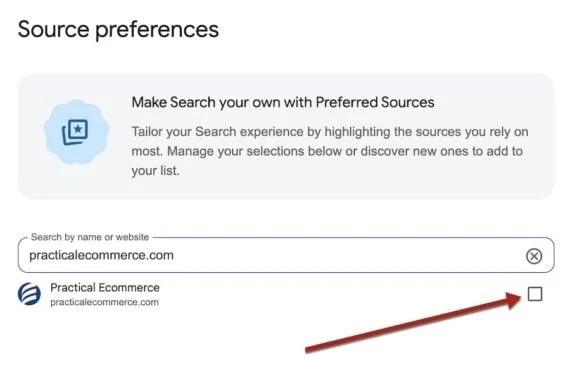
It is critical to note a significant nuance in Google’s implementation: AI Overviews (SGE) and "AI Mode" are not included in this channel. Google continues to categorize traffic from these specific search-integrated AI features as "Organic Search." This distinction is vital for SEO professionals. If you are tracking the efficacy of your content in Google’s own AI search snapshots, you must still look toward traditional Organic Search metrics, as the AI Assistant channel is strictly reserved for standalone chat interfaces and LLM platforms.
A Step-by-Step Guide to Navigating the Report
The data provided by the AI Assistant channel is not hidden in an obscure corner of the platform, but it does require a specific navigational path to access.
Accessing the Primary Dashboard
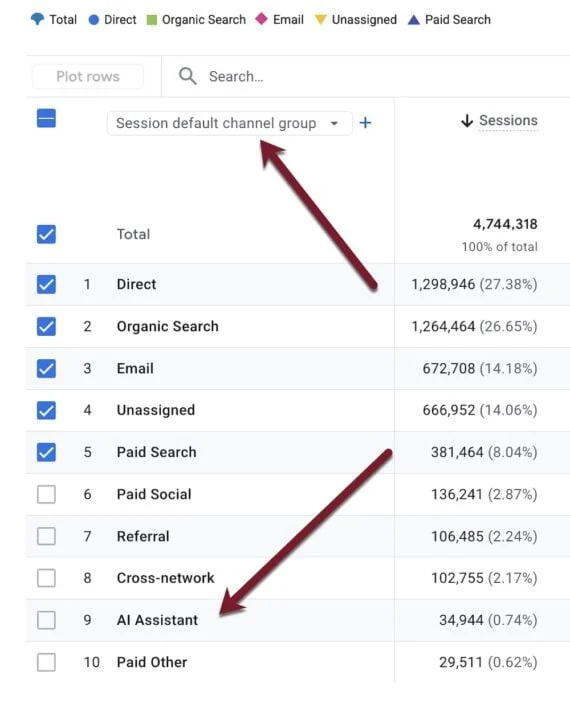
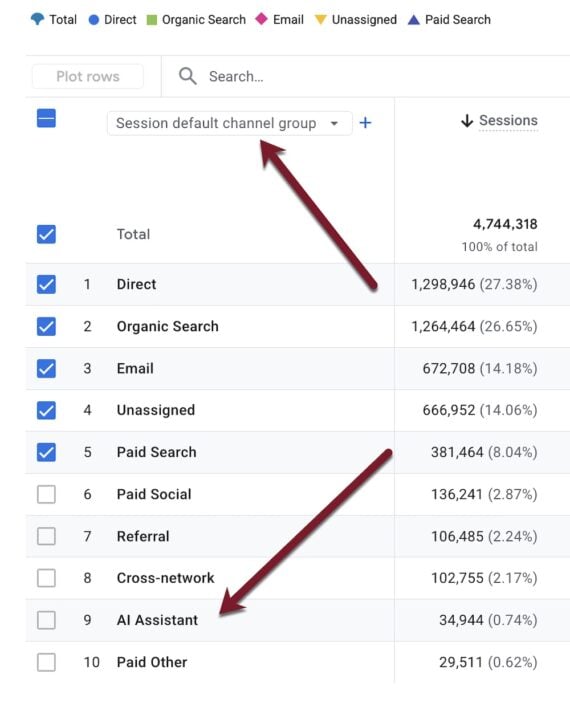
To view your AI-driven performance, navigate to Reports > Acquisition > Traffic acquisition. Within the table, look for the "Session default channel group" dimension. If you have been receiving traffic from these sources, "AI Assistant" will now appear as a distinct row alongside standard categories like Paid Search, Organic Social, and Referral.
By selecting this, you can view the full suite of engagement metrics for AI-referred users, including:
- Engagement Rate: How many users interact meaningfully with your content after clicking an AI citation.
- Events per Session: Identifying if AI users are more or less likely to trigger specific conversion events.
- Average Engagement Time: Providing a qualitative look at whether AI-directed traffic is "high intent" or merely "curiosity-driven."
Analyzing Landing Page Efficacy
One of the most powerful applications of this new feature is identifying which specific pages are being cited by AI models. To pinpoint these, navigate to Reports > Engagement > Pages and screens.
- Add a Filter: Click the "Add filter" button at the top of the graph.
- Define the Dimension: Select "Session default channel group."
- Select the Match: Choose "AI Assistant" as the match type.
By applying this filter, your report will collapse to show only the pages that have successfully converted a chatbot interaction into a click-through. This provides a clear roadmap of the content types—be they technical documentation, blog posts, or product descriptions—that LLMs currently trust as authoritative sources.
Comparing AI Traffic Against Organic Benchmarks
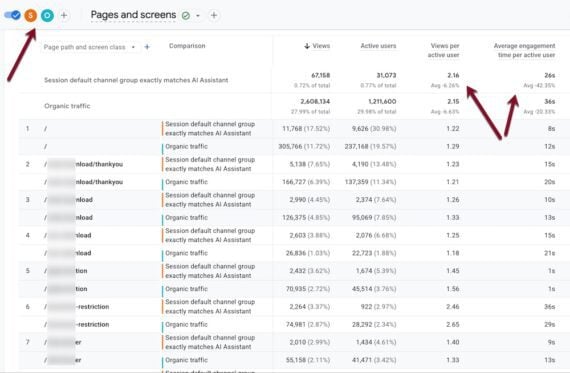
To truly understand the value of AI-assisted traffic, you must compare it against your baseline organic search performance. In the same Pages and screens report, use the "Add comparison" function.
By creating a comparison between the "AI Assistant" channel and "Organic Search," you can generate a side-by-side analysis of how users behave when arriving from a search engine versus an AI chatbot. My own testing suggests a fascinating trend: the top-performing pages for AI traffic rarely overlap perfectly with those that dominate organic search.
This implies that AI models are sourcing information based on different criteria than traditional search algorithms. Where Google Search might prioritize backlink authority and page speed, AI models often prioritize concise, factual, or context-rich text that directly answers a specific query. By identifying the pages that "win" in the AI space, you can further refine your content to cater to these models.
Deep-Dive Analysis with Regular Expressions (Regex)
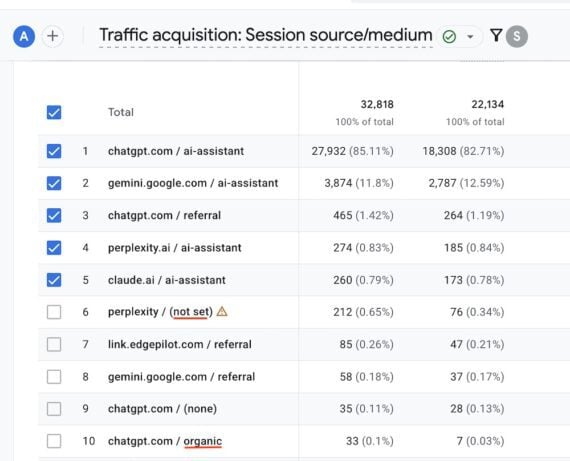
While the AI Assistant channel is convenient, it acts as a "black box," aggregating all platforms into one group. For power users who want to know exactly how much traffic is coming from OpenAI versus Perplexity or Microsoft Copilot, Regex is the solution.
By customizing your Session source/medium report and applying a filter with the following regular expression, you can break down the individual contributors:
.*chatgpt.com.*|.*perplexity.*|.*edgepilot.*|.*copilot.microsoft.com.*|.*openai.com.*|.*gemini.google.com.*|.*claude.ai.*|.*grok.x.ai.*
This granular view allows you to identify if a particular AI platform is driving high-quality leads compared to others. You may find, for instance, that Perplexity users spend significantly more time on site than those coming from ChatGPT, providing you with actionable data on where to focus your "AI Optimization" efforts.
Implications for the Future of SEO
The emergence of this channel forces a reevaluation of the term "SEO." As search engines pivot toward generative responses, "Search Engine Optimization" is slowly evolving into "Answer Engine Optimization."
1. The Rise of Citations as Currency
If a page is not being cited by an AI, it effectively does not exist in the new conversational web. The AI Assistant report acts as a validation mechanism for your "AI-readiness." If your traffic from this channel is low, it indicates that your content is not being indexed or trusted by LLM crawlers.
2. Content Structure Matters
Generative AI models excel at synthesizing information. Pages that utilize clear schema markup, structured headers, and concise, objective answers are significantly more likely to be cited. The AI Assistant channel allows you to verify if your structural changes are having the intended effect.
3. Discrepancies and Data Inconsistencies
It is important to note that the AI Assistant channel is not yet perfect. In initial tests, some traffic from known AI sources may still appear under "Organic" or "(not set)." This is likely due to the varied referral headers sent by different AI wrappers and browsers. As the technology matures, expect Google to refine the classification logic, but for now, treat the data as a high-fidelity indicator rather than a 100% complete census of all AI interactions.
Strategic Recommendations
As you integrate this data into your workflow, consider these three strategic pivots:
- Audit Top-Performing AI Pages: Take your top five pages identified by the AI Assistant filter and analyze them. Are they FAQ-style pages? Do they contain data tables? Use these as templates for future content creation.
- Monitor Prompt Correlation: Use external tools like Semrush or Ahrefs in conjunction with your GA4 data. If you see a spike in traffic to a specific page from an AI source, look for the keywords that would likely prompt an AI to cite that page.
- Adjust Conversion Goals: Do not assume that an AI-referred user has the same intent as an organic search user. A user arriving from a chatbot may be looking for a quick fact, whereas an organic user may be looking for a product. Segment your conversion tracking accordingly.
Conclusion
Google Analytics 4’s AI Assistant channel is a long-overdue bridge between the old world of search-based traffic and the new world of conversational AI. While it does not capture the entirety of the AI search landscape—specifically omitting AI Overviews—it provides the most transparent view into chatbot referral behavior we have had to date.
For marketers, this is a call to action. We are no longer just fighting for rank; we are fighting for inclusion in the "AI-generated answer." By leveraging the reports, comparisons, and regex techniques outlined above, you can stop guessing about the impact of AI and start building a data-backed strategy for the next generation of web traffic. The future of search is conversational, and with this new tool, you finally have the data to join the conversation.