Streamlining On-Page SEO Diagnostics: A Comprehensive Review of the SEOquake Three-Minute Audit Workflow
In the fast-paced world of digital marketing, website underperformance demands immediate answers. Whether a flagship e-commerce product page has slipped in search engine results pages (SERPs), a competitor’s blog post is siphoning organic traffic, or a client landing page is failing to convert, digital marketers rarely have the luxury of initiating a slow, multi-hour site crawl just to identify the root cause.
Enter rapid diagnostic tools. Designed to bridge the gap between initial triage and deep technical analysis, free browser-based utilities have transformed how search engine optimization (SEO) professionals approach web page audits. Among these, the SEOquake Chrome extension—developed by digital visibility platform Semrush—stands out as an essential instrument.
This report provides an in-depth breakdown of a streamlined, three-minute SEOquake auditing workflow. By examining a live case study of an e-commerce product page (UnderFit), this article explores how marketers can transition from initial triage to tactical diagnosis without ever leaving the page.
1. Main Facts: Understanding SEOquake and the Three-Minute Framework
SEOquake is a robust, free browser extension that allows users to audit any webpage for technical signals, on-page SEO elements, internal and external linking structures, and core Semrush metrics. Rather than forcing an auditor to wait for an enterprise crawler to map an entire domain, the extension shifts the focus entirely to the document object model (DOM) and metadata of the active URL.
Core Capabilities of the Extension
Immediate Page Triage: Provides high-level visibility into core SEO indicators, including meta titles, descriptions, canonical tags, and HTTP status codes via a Quick View pop-up.
Granular Technical Auditing: Scans for structural anomalies, mobile responsiveness markers, schema validation flags, and XML sitemap integrations.
Content and Keyword Analysis: Evaluates heading hierarchies (H1 through H6), image alt text distributions, and keyword densities.
Link Health Inspection: Delineates internal versus external links, flagging broken destinations and identifying JavaScript-dependent routing paths.
Third-Party Metric Integration: Pulls historical domain authority, traffic estimates, and backlink data directly from the Semrush database.
To maintain maximum efficiency, the diagnostic methodology is divided into two distinct time blocks: Minute One for rapid triage, and Minutes Two to Three for comprehensive diagnosis using the Full Report panels. Furthermore, results across all modules are color-coded (typically green, orange, and red), enabling practitioners to immediately distinguish between healthy signals, non-critical warnings, and severe technical blockers.
2. Chronology of the Audit: From Triage to Deep-Dive Diagnosis
Executing a swift and accurate webpage assessment requires strict adherence to a chronological framework. Attempting to review every line of HTML code or analyze thousands of backlinks simultaneously leads to analysis paralysis. By following a structured timeline, an auditor can isolate critical site errors in minutes.
Minute One: Triage via the Quick View Pop-Up
The primary objective of the first 60 seconds is answering a singular question: Is there an obvious, critical failure on this page?
When evaluating a target URL—such as an e-commerce product page for UnderFit—the auditor clicks the SEOquake browser icon to launch the Quick View pop-up. This interface features five distinct tabs, of which three are prioritized for rapid scanning (allocating roughly 20 seconds per tab):
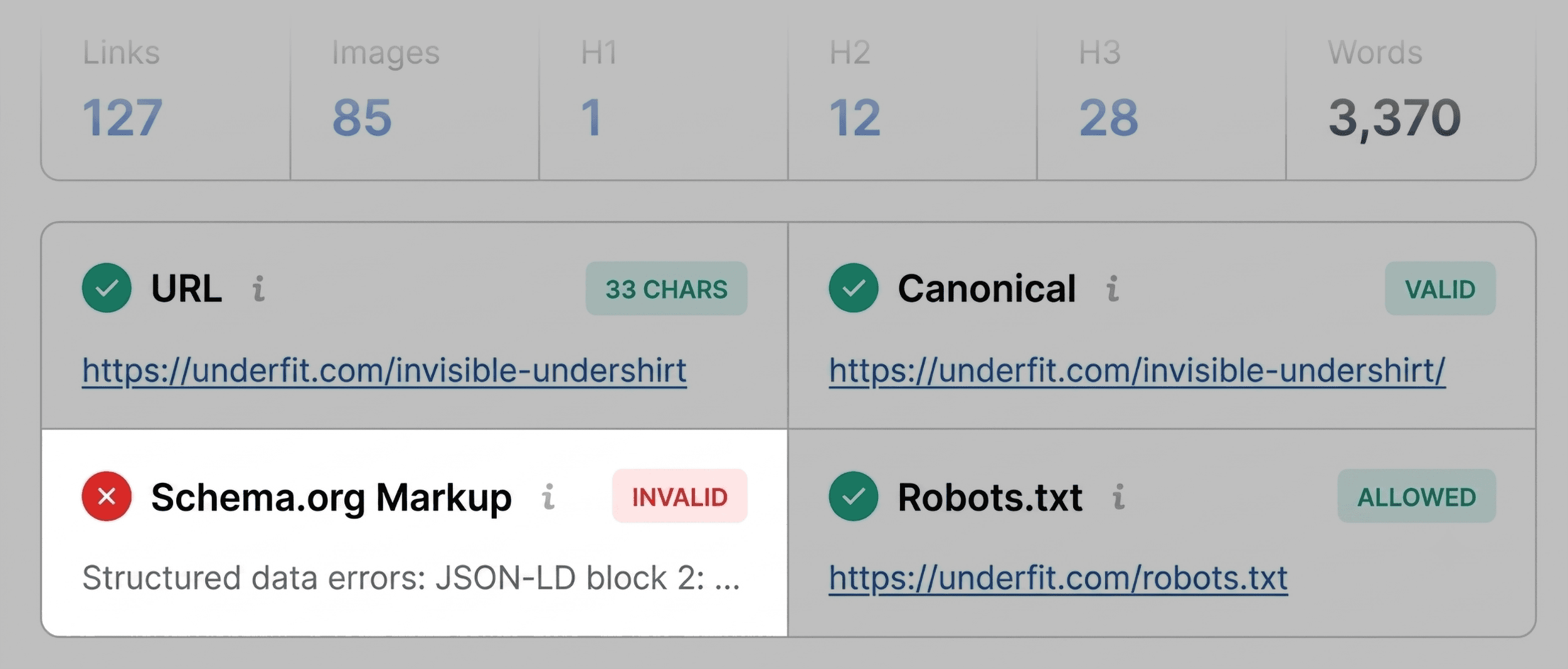
The Page Info Tab: Evaluates core elements including the Title tag, Meta Description, URL structure, and Meta Robots directives. During the UnderFit evaluation, this tab immediately flagged the page’s Schema.org markup in red. Further inspection revealed JSON-LD formatting errors, rendering the structured data unparsable by search engine bots. For an e-commerce platform, invalid product schema represents a severe threat, as it strips the page of eligibility for rich results (such as price, availability, and aggregate review stars in SERPs). Additionally, minor warnings regarding title length and meta description boundaries were noted for later review, though they did not constitute immediate blockers.
The Audit Tab: Focuses on foundational technical checks, such as mobile viewport configurations, HTTP/HTTPS security protocols, and canonicalizations. While the UnderFit audit returned mostly green and orange signals (indicating no immediate server-side emergency), orange warnings regarding language declarations (hreflang) required contextual judgment based on the site’s geographic targeting strategy.
The Content Tab: Details content architecture, text-to-html ratios, heading distributions, and image optimization metrics. For the UnderFit product page, the content tab revealed structural anomalies: the primary H1 tag was positioned deep within the body copy rather than near the top of the page, and the header hierarchy jumped erratically (moving directly from an H1 to an H4). Furthermore, the image summary flagged that 36 distinct images lacked alt text, presenting both an accessibility barrier and a missed opportunity for image search optimization.
Minutes Two and Three: Diagnosis via the Full Report Panels
Having compiled a prioritized list of anomalies during the triage phase, the auditor clicks "View Full Report" to access the granular diagnostic panels. This stage transitions the workflow from observation to root-cause analysis.
The Full Report houses six specialized panels: Overview, Diagnosis, External Links, Internal Links, Keyword Density, and Page Semantics. By navigating directly to the panels corresponding to the flags discovered in Minute One, the auditor verifies the severity of each issue:
Deep-Differentiating Technical Issues: Utilizing the Full Audit panel, the auditor tests the invalid schema markup directly within Google’s Rich Results Test tool. The external validation confirms three critical parser errors, locking the item into the final remediation list. Concurrently, a warning regarding an unlinked XML sitemap (https://underfit.com/sitemap.xml) is investigated to determine crawler discoverability risks.
Evaluating Topic Coverage via Keyword Density: To ensure the page is optimized for its target terms without falling into keyword stuffing, the auditor reviews the Keyword Cloud and keyword frequency tables. For UnderFit, primary terms such as "undershirt," "fit," "fabric," and "v-neck" appeared prominently in high-value locations (title tags, H1s, and meta descriptions), confirming proper topical alignment. Secondary anomalies—such as UI-driven terms like "zoom zoom" appearing in the phrase lists—were correctly identified as artifacts of interactive button elements and image magnification scripts within the DOM rather than spammy body copy.
Inspecting Link Health: The Links panel provides a complete manifest of all internal and external anchors. The scan revealed 1 broken internal link and 37 broken external links. Drilling down into the external links table confirmed that the vast majority were associated with client-side JavaScript handlers or deprecated social widgets. While not all JavaScript links negatively impact core rankings, they require developer verification to ensure link equity is not being wasted on dead ends.
3. Supporting Data and Technical Observations
Quantitative data gathered during browser-based audits serves to anchor qualitative marketing decisions in hard metrics.
Diagnostic Category
Metric / Finding
Severity Level
Recommended Action
Schema Markup
JSON-LD parsing errors; 3 invalid items detected
High (Red)
Fix structural syntax errors to regain eligibility for e-commerce rich snippets.
Heading Structure
Delayed H1 placement; irregular jumps (H1 to H4)
Medium (Orange)
Restructure HTML hierarchy to align with semantic web standards.
Image Optimization
36 images missing alt attributes
Medium (Orange)
Populate descriptive alt text for accessibility and image search visibility.
XML Sitemap
Sitemap exists but lacks prominent internal linking
Medium (Orange)
Ensure proper sitemap declaration in robots.txt and footer architecture.
Audit JavaScript event listeners and redirect or remove broken paths.
4. Official Responses and Industry Perspectives
The reliance on browser-level diagnostic extensions reflects a broader shift in modern SEO methodology. According to industry insights from leading digital marketing authorities, enterprise-scale site audits remain vital for overarching health architecture, but micro-audits are increasingly necessary for agile, iterative content optimization.
"When dealing with client pages that fail to convert or product listings that drop overnight, wasting valuable hours running full-site crawls is inefficient," notes an enterprise SEO strategist. "Tools that offer immediate, document-level triage allow practitioners to isolate template-level bugs, rendering errors, and metadata misconfigurations in the time it takes to brew a cup of coffee."
Platform developers emphasize that extensions like SEOquake are designed to act as a bridge to deeper database tools. By integrating browser telemetry with comprehensive suites—such as Semrush’s traffic analytics, backlink monitors, and automated site crawlers—marketers can contextualize page-level performance against broader domain trends. For instance, a weak, poorly optimized landing page residing on a high-authority domain with robust organic traffic typically indicates a localized content or layout error rather than a domain-wide penalty.
5. Strategic Implications and Final Recommendations
The practical takeaway of a three-minute SEOquake workflow lies in its ability to separate page-level fixes from site-wide infrastructure problems.
Execute Immediate Page-Level Corrections: Issues such as missing image alt text, suboptimal heading hierarchies, and missing meta descriptions can be addressed directly within the Content Management System (CMS) for the specific URL in question.
Escalate Template and Structural Errors: Schema validation failures, missing XML sitemap declarations, and sitewide JavaScript link failures frequently indicate systemic issues within the site’s underlying templates or theme files. When these flags appear, relying solely on page-level edits is insufficient.
Transition to Full Site Audits: To resolve structural vulnerabilities that span thousands of URLs, digital marketers must graduate from browser extensions to dedicated site auditing software. Running a comprehensive domain crawl allows developers to identify template-wide JSON-LD bugs, fix broken pagination chains, and optimize server response times across the entire digital property.
By mastering rapid diagnostic workflows, SEO professionals can drastically reduce time-to-insight, prioritize engineering backlogs with precision, and ensure that individual web pages are continuously optimized for both human users and modern search algorithms.