By Digital Commerce Desk
Published: September 2026
Main Facts: Unlocking the Visual Discovery Channel
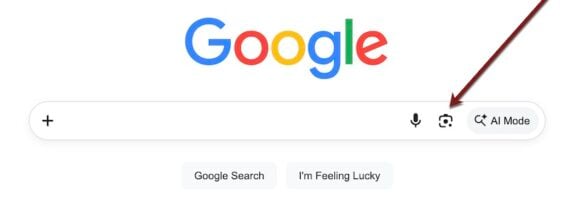
Google has significantly expanded its data reporting capabilities for website owners and digital marketers by introducing a dedicated "Multimodal" filter within Google Search Console. Designed specifically to track performance driven by image and visual searches, this new metric allows merchants and content creators to see exact URLs that users viewed or clicked when conducting searches via image inputs (such as Google Lens, Circle to Search, or desktop browser image uploads).
For years, search engine optimization (SEO) professionals have treated image search as a secondary traffic channel—often difficult to quantify beyond basic Google Images traffic reports. The new Multimodal filter changes this dynamic. Because modern consumers increasingly rely on visual queries to discover products, fashion items, home decor, and specialty goods, this feature lays bare a previously opaque discovery channel.
Key takeaways of the new Google Search Console update include:
- Precise Pathing: Merchants can now track specific landing pages and URLs that users landed on after a visual search query.
- No Text Queries: Because these searches begin with an image rather than text strings, the report does not display search keywords; instead, it tracks user engagement metrics (clicks, impressions, average position, and click-through rates) strictly tied to visual entry points.
- Strategic Accessibility: The feature is easily accessible inside the standard Search Console performance dashboard, bridging the gap between traditional web analytics and modern visual AI discovery.
Chronology: The Evolution of Visual Search Reporting
To understand the significance of the Multimodal filter, it is necessary to look at how visual search technology has matured over the past decade.

- 2017–2018 (The Birth of Google Lens): Google introduced Google Lens, shifting visual search from a novelty concept to a practical tool powered by machine learning. Users could point their smartphone cameras at objects, plants, and products to instantly find matches online.
- 2021–2023 (Mainstream Adoption & Multimodal AI): Visual and multimodal searches (combining images with text or using context-aware visual queries) became deeply integrated into everyday mobile experiences. Features like "Circle to Search" on Android devices accelerated how frequently consumers initiated searches through imagery rather than keywords.
- 2024–2025 (The Blind Spot for Marketers): While consumers embraced visual commerce, digital marketers faced a major reporting roadblock. While Google Analytics and Search Console tracked traditional text-based organic search and standard Google Images clicks, there was no granular way to isolate traffic originating specifically from advanced visual matching tools like Google Lens.
- September 2026 (The Multimodal Filter Launch): Google bridges this analytical gap by releasing the Multimodal filter in Search Console. For the first time, webmasters gain clear visibility into how their visual assets perform in modern AI-driven image discovery environments.
Supporting Data & Navigation: How to Access the Multimodal Filter
Finding and interpreting this new data requires navigating a specific path within the Search Console interface.
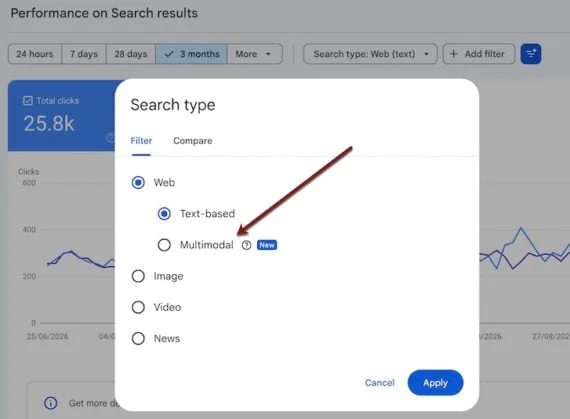
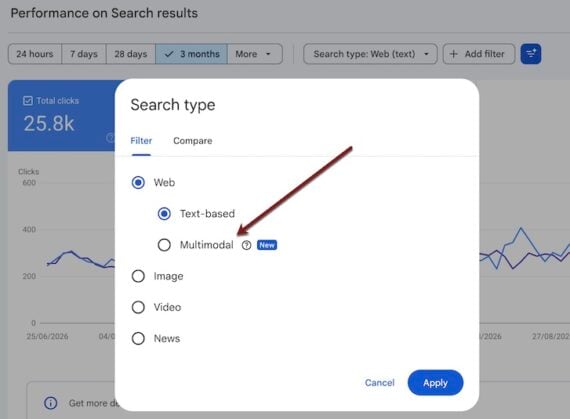
To access the report, users must follow this pathway:
Google Search Console > Performance > Search results > Search type: Web > Multimodal
What the Report Shows (and Doesn’t Show)
Because visual searches do not rely on standard keyword strings, webmasters will notice a few unique characteristics in their Search Console dashboards:
- Absence of Queries: The traditional "Queries" tab remains blank or irrelevant for these specific multimodal views, as the user’s "query" was an uploaded photograph or a captured screen segment rather than typed words.
- Missing Source Images: The filter does not expose the exact user-uploaded image that triggered the match. Instead, it aggregates data on the destination URLs on your site that successfully matched and delivered a satisfying user experience.
- Core Performance Metrics: Standard metrics—Total Clicks, Total Impressions, Average Click-Through Rate (CTR), and Average Position—are fully available, allowing merchants to gauge which pages win visibility in visual shopping environments.
Official Responses & Industry Perspectives
Search engine optimization experts and e-commerce consultants have widely praised the update, viewing it as long-overdue validation for investments in high-quality product photography and visual metadata optimization.
Noted search optimizer Marie Haynes highlighted the strategic value of aligning product visuals with consumer intent, noting that generative AI platforms can assist merchants in auditing their visual content gaps. According to industry analyses, minor adjustments to background settings, product angles, and textural details can dramatically alter a product’s visibility in visual search engines.
Furthermore, platform ecosystems are responding. E-commerce giants like Shopify and content management systems like WordPress (via plugins such as WooCommerce XML sitemap generators) have long supported basic image indexing. However, industry leaders emphasize that standardizing image-only sitemaps is quickly moving from a "nice-to-have" tactical option to a core technical SEO requirement.
Implications for E-Commerce Merchants and SEO Strategies
The rollout of the Multimodal filter fundamentally shifts how online retailers must approach technical and creative optimization. Winning traffic from visual search requires moving beyond standard keyword optimization and embracing a holistic visual SEO strategy.
1. Optimize and Submit Image Sitemaps
Image search results are heavily dependent on Google’s crawler discovering and indexing your visual media efficiently. Submitting a dedicated image sitemap via Search Console (Indexing > Sitemaps) directly informs Google of your product catalog’s visual assets, boosting indexation rates and ensuring your pages are tracked properly within the new multimodal reports.
While platforms like Shopify automatically integrate images into primary sitemaps, advanced merchants utilize specialized image-only sitemap apps to monitor precise indexing health.
2. Double Down on Traditional Image SEO Fundamentals
Fundamental optimization practices remain critical. Images that rank well in standard web and text-based searches naturally perform better in visual matching engines. Best practices include:
- Descriptive File Names: Avoid generic names like
IMG_1042.jpg. Use keyword-rich identifiers such asblue-velvet-accent-chair.jpg. - Optimized Alt Text: Write concise, descriptive alternative text that clearly explains what the image portrays.
- Contextual Captions: Use relevant captions on product pages to provide semantic context for Google’s crawlers.
3. Focus on Quality and Resolution
Low click-through rates within the multimodal report often point to a foundational problem: poor image quality. Many e-commerce stores rely on compressed, low-resolution thumbnail images pulled automatically from category or collection pages.
When a consumer performs a visual search on Google Lens and sees a blurry thumbnail alongside a crisp competitor photo, they will naturally click the competition. Merchants should audit their collection pages, upgrade key product thumbnails to high-resolution formats, and test their images manually using Google Lens to see how they compete visually.
4. Diversify Angles, Colors, and Contexts
Visual search algorithms identify objects regardless of angle, color, or orientation, but the top-ranking results frequently mirror the positioning and environment of the user’s source photo. For example, if a user uploads a photo of a plush toy photographed from the front, Google’s visual match results will heavily favor similar frontal angles.
To maximize ranking opportunities across diverse user queries, merchants should diversify their product photography libraries to include:

- Multiple viewing angles (front, side, back, top-down).
- Close-up details highlighting textures and material quality.
- Lifestyle shots and varied color variants.
5. Leverage Generative AI for Visual Strategy
Digital marketers can utilize generative AI (genAI) platforms to brainstorm creative optimizations for visual search. By prompting AI assistants to analyze top-performing visual trends in specific niches (such as home decor, apparel, or specialty hardware), merchants can uncover patterns regarding which colors, textures, or complementary background decors perform best in visual discovery feeds.
Action Plan for E-Commerce Teams
- Audit Current Performance: Navigate to the new Multimodal report in Search Console to establish a baseline of your current visual search traffic and impressions.
- Fix Technical Gaps: Ensure image sitemaps are up to date and correctly submitted.
- Enhance Visual Assets: Upgrade low-resolution collection thumbnails and expand product photography galleries to include multi-angle and lifestyle shots.
- Track and Iterate: Log your optimization changes, set a review date, and monitor how your CTR and impressions evolve inside the Search Console multimodal dashboard over the coming quarters.