

Introduction: The Endless Dilemma of Data Browsing
We have all experienced the friction firsthand. Whether navigating an extensive catalog of e-commerce products, parsing through endless search queries, reviewing historical order logs, or managing massive data tables, users frequently face towering walls of information. While sophisticated filtering, robust search bars, and granular sorting tools are standard components of modern interface design, they are only half the battle. Digital architects must also actively facilitate the seamless exploration of relevant entries by accelerating and supporting the browsing experience itself.
When tasked with designing long lists, natural design instincts often pull practitioners toward reliable, old-fashioned pagination. Yet, as specific project requirements emerge—particularly in fast-paced content feeds or e-commerce discovery spaces—designers inevitably begin questioning whether infinite scroll might be a superior solution.

Opinions on infinite scroll are notoriously polarized, and for good reason. Historically, the pattern has earned a reputation for inducing user frustration, cognitive overload, and accessibility nightmares. However, recent advancements in UI/UX research suggest that infinite scroll is not inherently flawed; rather, it is frequently misimplemented. By integrating advanced design patterns—such as smart bookmarking, persistent footer reveals, dynamic URL manipulation, and hybrid pagination—designers can harness the raw speed of infinite scroll without sacrificing user control.
The Core Pitfalls of Traditional Infinite Scroll
To understand how to fix infinite scroll, we must first examine why it has earned such a notorious reputation in the UX community. The challenges associated with endless scrolling are well-documented by usability authorities like the Nielsen Norman Group:
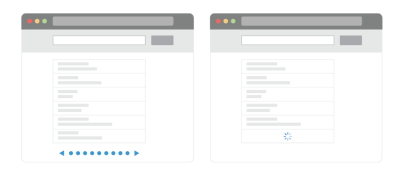
- The Information Abyss: Presenting an overwhelming volume of options without a visible endpoint can make users feel as though they are drowning in data. Once the number of displayed items breaches a comfortable cognitive threshold, a significant percentage of users abandon the page entirely.
- Loss of Context and Control: Traditional infinite scrolls offer zero control over when and how many items load. Furthermore, distinguishing between "old" and "new" items becomes nearly impossible once a user scrolls up and down a few times.
- The Broken URL and Bookmarking Problem: In many infinite scroll implementations, the address bar remains static. If a user finds an interesting item deep within the feed, refreshing the page or trying to share the exact location with a colleague is virtually impossible.
- The Unreachable Footer: Users attempting to reach the site footer find themselves trapped in a frustrating game of cat-and-mouse. As they scroll down to access crucial footer links, new items load instantaneously, pushing the footer further down the page. Frustrated users often resort to hammering the
Esckey in a futile attempt to halt the script. - Broken Scrollbars: A scrollbar serves as a psychological promise regarding the length of a page. Infinite scroll constantly breaks this promise, as the scrollbar handle shrinks and recalibrates with every newly loaded batch of data.
- Accessibility and Performance Bottlenecks: Screen readers struggle to properly announce dynamically injected content to visually impaired users. Additionally, on choppy mobile connections, continuous fetching frequently causes layout shifts, severe latency, and performance degradation.
Because these issues stem from poor usability, designers have traditionally avoided infinite scroll in favor of static pagination or "Load More" buttons.
Evaluating Alternatives: Pagination and the "Load More" Pattern
The Reliability of Pagination
Pagination avoids nearly all infinite scroll issues by establishing a rigid structure. Users are provided with a clear beginning and a clear end. Moving from one page to the next creates a definitive cognitive cut between seen and unseen content, fostering a strong sense of completion and control. URLs change per page, footers remain permanently accessible, and items are easy to manage.
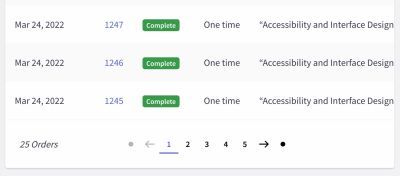
However, usability testing reveals a distinct drawback: pagination is slow. While predictable, it forces users to slow down significantly. Users typically spend more time agonizing over the first few pages, utilizing filters aggressively, but ultimately viewing fewer total items and demonstrating lower overall engagement compared to infinite scroll streams.
The Middle Ground: The "Load More" Pattern
To capture the benefits of pagination while avoiding the overwhelming nature of infinite scroll, many digital platforms utilize the "Load More" button pattern.
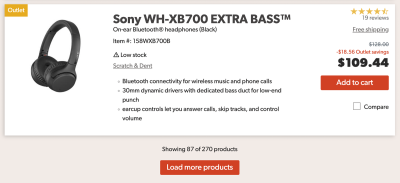
In this setup, initial page loads display a modest number of items (e.g., 10 on mobile, 30 on desktop). As the user scrolls, new items may load automatically for the first few batches. However, once a specific threshold is met—such as 50 items—the infinite stream pauses, presenting an explicit "Load More" button.
This approach restores user agency, keeps the footer within reach, updates the URL dynamically, and significantly boosts user engagement without inducing information fatigue.
Advanced UX Strategies: Fixing Infinite Scroll
Abandoning infinite scroll entirely is unnecessary if your platform thrives on rapid content discovery. Instead, modern UX research highlights several sophisticated techniques to remediate the traditional flaws of endless scrolling.
1. Bookmarking and Saving Positions in the List
The most effective way to improve infinite scroll is to explicitly mark the breaks between batches of content. By introducing generous whitespace and visual dividers between "new" and "old" segments, users can easily track where they left off.
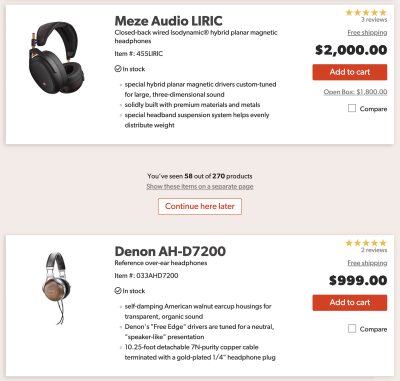
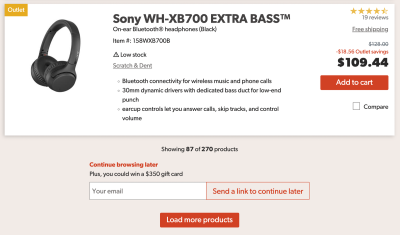
Furthermore, interfaces can provide a "Continue here later" button. When clicked, the system can store the position locally in the browser or trigger a lightweight modal prompting the user to email a direct link to themselves. Changing the phrasing to “Copy a link to this position in the list” empowers users to seamlessly resume browsing across multiple devices or at a later date.
2. The Persistent Footer Reveal
Solving the unreachable footer problem requires rethinking how page boundaries are treated. Much like sticky headers, designers can implement a footer reveal pattern—a discreet, persistent bar anchored to the bottom right of the viewport. Tapping or clicking this icon toggles an accordion that reveals the full footer without disrupting the ongoing data stream. Crucially, this element must be fully navigable via keyboard inputs to maintain accessibility compliance.

3. Dynamic Pagination and Hybrid Models
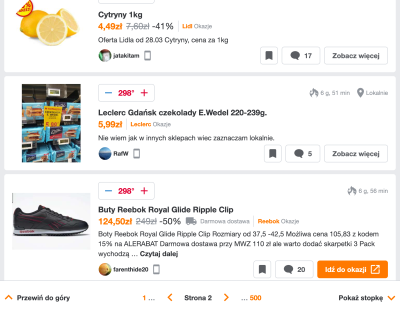
Some platforms successfully merge pagination with infinite scrolling. As users scroll down, the page dynamically updates the URL and displays the current page number in a sticky bottom navigation bar.
Platforms like Pepper.pl showcase this brilliantly: users can scroll infinitely for speed, but they also have access to a drop-down chevron next to the page number, enabling them to instantly jump to specific segments (e.g., jumping straight to page 7). The browser’s "Back" button functions logically, returning the user to the referring page rather than trapping them in a history-polluting loop of every micro-scroll event.

4. Contextual Scrollbars and Mini-Maps
Research companies like the Baymard Institute advocate for making scrollbars inherently smarter. By embedding dynamic range labels—such as pricing intervals or alphabetical markers—alongside the scrollbar, users gain immediate visual context regarding their position in a sorted list.
Taking this a step further, experimental UI concepts like Rauno Freiberg’s Minimap experiment allow users to pin, bookmark, and visually stamp specific regions of a long document or data stream, creating instant jump-links to favorite areas.
Strategic Implementation Checklist
Before integrating infinite scroll into your next enterprise application or e-commerce platform, consider the following checklist derived from modern interface design patterns:
- Define User Intent: Are your users executing exploratory browsing (ideal for infinite scroll) or searching for specific, targeted data points (ideal for pagination)?
- Ensure URL State Management: Ensure that deep scrolls update the browser history or provide explicit anchor links so users can bookmark and share their exact location.
- Guarantee Keyboard and Screen Reader Accessibility: Dynamically injected DOM elements must be programmatically announced to assistive technologies, and all interactive triggers must be fully accessible via keyboard navigation.
- Implement a Footer Escape Hatch: Never allow an infinite stream to permanently trap or bury the site footer. Utilize sticky navigation drawers or footer reveal buttons.
- Optimize for Performance: Lazy-load images, implement robust virtualization for massive DOM trees, and ensure graceful degradation on unstable mobile network connections.
Conclusion: Is the Effort Worth It?
Making infinite scroll work gracefully is undeniably labor-intensive. It requires meticulous attention to URL architecture, accessibility compliance, state management, and visual hierarchy. For platforms dedicated to rigorous comparison shopping or highly specific data retrieval, infinite scroll remains an ill-fitting solution.

However, for content discovery platforms, social feeds, and high-volume e-commerce catalogs where rapid exploration and multi-item purchasing behavior dominate, perfecting infinite scroll is well worth the engineering investment. By bridging the speed of endless feeds with the safety nets of pagination, bookmarking, and sticky footers, designers can turn an exhausting information abyss into an engaging, empowering digital experience.