In the modern digital landscape, user experience (UX) design is constantly walking a tightrope between aesthetic innovation and functional usability. Among the most enduring battlegrounds in interface design is the ongoing debate between traditional pagination and infinite scrolling. While pagination offers predictability and a comforting sense of closure, infinite scrolling delivers unmatched speed and momentum. However, infinite scroll has historically been plagued by well-documented usability failures—from disappearing footers and broken scrollbars to the psychological weight of an information abyss.
As platforms strive to help customers explore relevant entries quickly and efficiently, a growing faction of UX researchers and interface designers are arguing that infinite scroll does not need to be abandoned entirely. Instead, it needs to be engineered better. By implementing thoughtful design patterns—such as dynamic bookmarking, footer reveals, and integrated pagination—developers can harness the speed of infinite scrolling while retaining the security and control of traditional navigation.
Main Facts: The Anatomy of the Infinite Scroll Dilemma
The fundamental friction of infinite scrolling lies in its disregard for traditional web conventions. When users encounter a long list of search results, product catalogs, order histories, or data entries, their natural instinct is to seek control, orientation, and closure. Infinite scroll frequently strips away these psychological anchors.
- The Information Abyss: As users keep scrolling, the sheer volume of options becomes overwhelming. Without a clear endpoint, visitors frequently experience cognitive fatigue, often abandoning the page altogether once the data exceeds a comfortable browsing threshold.
- The Broken Scrollbar: Standard scrollbars serve as a promise of page length. In an infinite scroll environment, every time new items load dynamically, that promise is broken, forcing the browser to constantly recalibrate the scrollbar’s thumb size and position.
- Navigation and State Loss: Navigating back to a previous spot or sharing a precise location via URL is notoriously difficult. Once a user leaves the page or refreshes, their progress is lost.
- The Footer Trap: Because new content continually appends itself to the bottom of the viewport, reaching the site footer—frequently home to crucial links, legal disclaimers, and contact info—turns into an frustrating game of agility and timing.
- Accessibility Hurdles: Screen readers often struggle to properly announce dynamically loaded items, creating significant barriers for visually impaired users operating on choppy network connections.
Chronology: The Evolution of List Navigation Patterns
To understand where UI design is heading, it is helpful to look back at how we arrived at today’s hybrid patterns.

1. The Era of Strict Pagination
In the early days of the web, pagination was the undisputed king. Websites split data into rigid, numbered pages (e.g., Page 1, 2, 3). This method offered absolute clarity: users knew precisely where they were, could easily jump to page 10, and experienced a satisfying sense of completion upon finishing a page. However, usability tests consistently revealed that pagination felt sluggish. Users browsed significantly less, spending disproportionate amounts of time on initial pages while engaging less with the broader catalog.
2. The "Load More" Compromise
Seeking to combine the best of both worlds, designers introduced the "Load More" button. Users would load a manageable initial batch of items (e.g., 30 on desktop, 10 on mobile), scroll to the bottom, and explicitly click a button to fetch the next batch. This restored a degree of user control and kept the footer accessible, though it still required active intervention from the user.

3. The Rise of Hybrid Dynamic Pagination
Recognizing that purely automatic infinite scrolling caused severe disorientation, contemporary UX practices have shifted toward hybrid models. Platforms are now adopting "dynamic pagination"—where infinite scroll is utilized for rapid browsing, but is paired with sticky footers, dynamic URL updates, and drop-down page-jump menus.
Supporting Data and UX Research Insights
Industry research from organizations like the Baymard Institute and Nielsen Norman Group highlights clear behavioral divergences between pagination and infinite scrolling users.
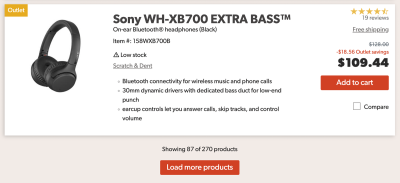
- Engagement vs. Precision: E-commerce data indicates that users on infinite-scroll interfaces view substantially more items and demonstrate higher initial engagement. However, this pattern breaks down if the user’s goal is comparative shopping or finding a highly specific item. For exploratory browsing, infinite scroll wins; for targeted search, it fails.
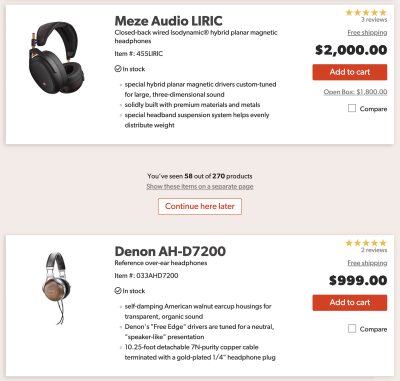
- The Threshold Sweet Spot: Advanced implementations, such as those analyzed on retail platforms like Crutchfield, reveal that a phased approach yields the highest satisfaction. For instance, a page might load items automatically for the first few scrolls, but seamlessly transition into a "Load More" or structured pagination threshold once the user crosses 50 to 60 items.
- Performance Metrics: Usability testing confirms that when infinite scroll is optimized with whitespace separators between "old" and "new" segments, user retention and task completion rates improve dramatically compared to an endless, monolithic stream of data.
Official Guidelines and Design Solutions
To rescue infinite scrolling from its poor usability reputation, designers must implement a rigorous set of structural safeguards.
Bookmarking and Position Tracking
To solve the issue of lost context, interfaces can introduce visual whitespace and distinct markers between batches of items.
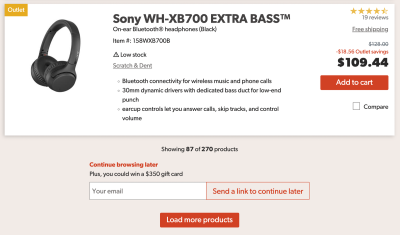
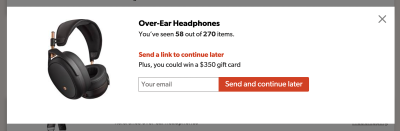
- Save Your Spot: Platforms can offer a "Continue browsing later" button. When clicked, it can either store the position locally in the browser or trigger a lightweight modal asking for an email address, sending the user a direct link to their exact location in the list.
- URL Parameterization: Updating the URL dynamically as the user scrolls allows them to copy a precise link to their current position in the list, enabling seamless sharing or cross-device continuation.
The Footer Reveal Pattern
To combat the unreachable footer, designers can integrate a sticky "footer reveal" mechanism—a persistent, non-intrusive toolbar anchored at the bottom of the viewport. When activated via click, tap, or keyboard navigation, an accordion smoothly expands to reveal the site footer without disrupting the infinite scroll state.
Dynamic Scrollbars and Mini-Maps
Advanced UX experiments are exploring innovative ways to restore scrollbar utility:
- Range Intervals: For sorted lists (such as products sorted by price), dynamic labels can be spaced vertically alongside the scrollbar, shifting as the user scrolls to indicate pricing brackets or data categories.
- Mini-Maps: Experimental interfaces (such as Rauno Freiberg’s minimap prototypes) allow users to pin or bookmark specific areas of interest on a visual sidebar, providing instant jump-to navigation across massive streams of content.
Implications for Future Digital Products
The evolution of infinite scrolling holds profound implications for software architects, e-commerce giants, and enterprise dashboard designers.
Implementing these advanced UX patterns requires a significant investment in front-end engineering, accessibility compliance (WCAG standards for screen readers), and performance optimization. It is not a design shortcut. Consequently, product teams must ask critical strategic questions before adopting infinite scroll: Are our users exploring a broad catalog, or are they executing precision searches and comparisons?
If exploratory browsing is the core use case—such as social media feeds, media galleries, or high-volume e-commerce discovery—investing in a well-engineered, hybrid infinite scroll is well worth the development effort. However, if precision and data comparison are paramount, traditional pagination or robust filtering mechanisms remain the superior choice.
Ultimately, infinite scrolling is no longer a binary choice between chaos and control. By respecting user orientation, maintaining accessible keyboard navigation, and providing clear structural boundaries, designers can turn the infinite abyss into a fast, fluid, and thoroughly enjoyable journey.