In the modern digital landscape, user experience (UX) design is constantly walking a tightrope between speed and control. When presenting long lists of search results, e-commerce products, financial orders, or extensive data entries, designers face a persistent dilemma. While robust search, filter, and sorting mechanisms are foundational, the core challenge remains: how do you help customers efficiently explore relevant entries without wearing them out?
For years, the default instinct leaned toward traditional pagination. Yet, the allure of infinite scroll—a seamless, never-ending stream of content popularized by social media feeds—frequently tempts design teams looking to optimize for unique use cases.
However, infinite scroll carries a notorious reputation among usability experts. Far from being a silver bullet, it often plunges users into an "information abyss" characterized by poor usability, broken scrollbars, accessibility hurdles, and cognitive overload. But does infinite scroll deserve total banishment, or can it be redesigned responsibly? By integrating smart interface patterns, designers can successfully harness the speed of continuous loading while retaining the security, predictability, and comfort of traditional pagination.
The Core Conflict: Infinite Scroll vs. Traditional Pagination
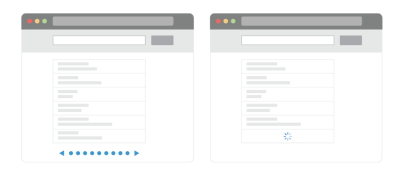
To understand why infinite scroll is so polarizing, one must examine its systemic failure points. While traditional pagination offers a predictable, structured journey with a clear beginning and end, infinite scroll introduces a cascade of frustrating side effects.
The Pitfalls of Endless Streaming
- Cognitive Overload: As the volume of displayed options expands far beyond a comfortable range, users frequently experience decision fatigue. Overwhelmed by an endless expanse of choices, a significant percentage of visitors simply abandon the page altogether.
- Loss of Orientation: Infinite scroll provides zero control over how and when items load. Once users scroll up and down past a batch of items, distinguishing between what they have already viewed and what remains unseen becomes nearly impossible without meticulous backtracking.
- The Broken Scrollbar: A standard scrollbar acts as a visual promise regarding the actual length of a document. Infinite scroll breaks this promise permanently; every time new items load asynchronously, the scrollbar recalibrates, eroding user trust and spatial awareness.
- The Footer Trap: Reaching the website footer becomes a frustrating game of dexterity. Because new content continually populates the DOM, users are often forced into a manic race—simultaneously scrolling faster and hitting the
Esckey—just to catch a glimpse of footer links before another content wave arrives. - URL and Bookmarking Failures: Most infinite scroll implementations fail to update the address bar dynamically. Consequently, users cannot bookmark their precise location in a list, nor can they easily copy and share a specific set of items with colleagues or family members.
- Accessibility and Performance Bottlenecks: Screen readers struggle to properly announce dynamically injected items, creating severe barriers for visually impaired users. Furthermore, on choppy mobile connections, asynchronous loading can severely degrade overall page performance.
The Counter-Argument: Why Pagination Isn’t Always Enough
Given these flaws, why do teams consider infinite scroll at all? Because usability tests frequently reveal that traditional pagination performs poorly when it comes to speed.
While pagination is orderly and predictable, it inherently slows users down. Visitors browsing paginated pages typically view fewer items in total and exhibit lower overall engagement compared to those navigating continuous feeds. They spend disproportionate time on the initial pages, relying heavily on filters and sorting mechanisms out of a perceived friction in moving forward.
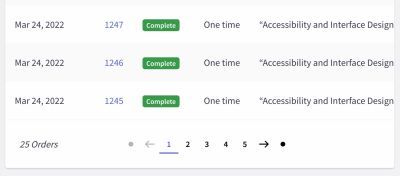
To capture the best of both worlds, designers must look past the binary choice between raw infinite scroll and rigid pagination, exploring hybrid frameworks and advanced remediation techniques.
Chronology of UX Evolution: From "Load More" to Dynamic Hybrids
As the digital design community wrestled with these trade-offs over the past decade, a chronological evolution of listing patterns emerged.
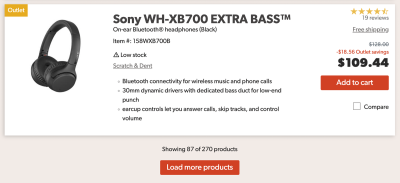
Phase 1: The Rise of the "Load More" Button
Recognizing the overwhelming nature of pure infinite scroll, UX architects introduced the "Load More" button. This pattern bridges the gap by giving users explicit control over when additional content enters the viewport.
Advanced implementations often combine automated and manual triggers. For instance, an e-commerce platform might automatically load the first 10 to 30 items as the user scrolls. Once a certain threshold—say, 50 items—is reached, the automated loading ceases, and a prominent "Load More" button appears. This approach maintains initial browsing momentum while restoring user agency and protecting the footer from disappearing forever.
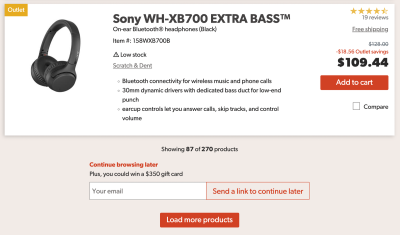
Phase 2: Solving the "Continue Browsing Later" Dilemma
To combat the inability to save a spot in an infinite stream, innovative platforms began experimenting with bookmarking features. Rather than forcing users to start over from scratch, modern UI prototypes allow users to click a "Continue browsing later" button.
This triggers a modal or inline prompt where users can input their email address to receive a direct link to their exact position in the list, or quickly copy a unique URL string to their clipboard. This minor UX addition bridges the gap between desktop and mobile sessions, ensuring seamless continuity across devices.
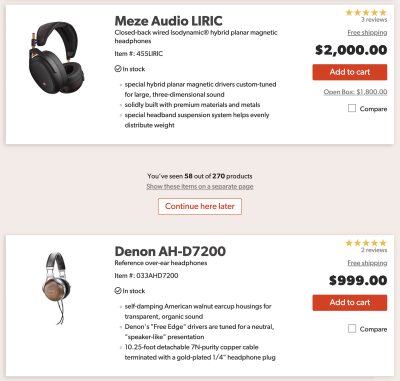
Phase 3: The Emergence of Dynamic Pagination and Footer Reveals
Contemporary UI engineering has pushed past simple buttons, pioneering hybrid systems that merge dynamic content loading with structural safety nets.
- The Footer Reveal: Recognizing that footers contain vital compliance, navigation, and contact information, designers created sticky footer modules. Accessible via a persistent button in the bottom corner (and fully navigable via keyboard), these modules allow users to slide open the footer on demand, entirely bypassing the endless scroll trap.
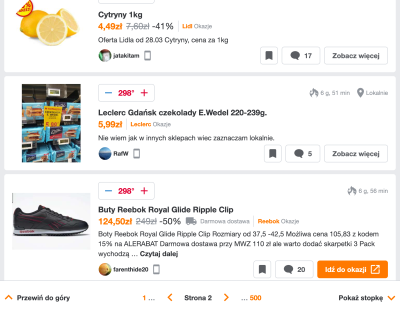
- Dynamic Pagination Bars: Pioneered by high-traffic community and e-commerce platforms, some sites now update the URL and page numbering dynamically within a sticky bottom bar as the user scrolls. Users can view their current "page" equivalent, jump instantly to a specific section via a drop-down menu, and rely on standard browser back buttons to return to their prior context without polluting browser history with every micro-scroll event.
Supporting Data and Industry Insights
User research conducted by leading UX institutions underscores the necessity of contextualizing these patterns based on user intent:

- Baymard Institute Research: Usability studies on e-commerce sites suggest that scrollbars can be made significantly more functional through dynamic range intervals. For example, if a user sorts a product catalog by price, integrating vertically spaced, dynamic price labels next to the scrollbar provides immediate spatial orientation, showing users precisely what price bracket they are currently viewing and allowing them to jump accordingly.
- Exploratory vs. Goal-Oriented Behavior: Data consistently shows that infinite scroll thrives in discovery-heavy environments (e.g., social media feeds, recipe blogs, and inspiration galleries) where users are primed for serendipitous exploration. Conversely, for goal-oriented tasks—such as comparing specific technical specifications or auditing administrative records—infinite scroll consistently underperforms compared to structured pagination and robust filtering.
Official Responses and Expert Consensus
Industry thought leaders maintain a nuanced stance on continuous loading patterns. The overarching consensus from UX heavyweights like the Nielsen Norman Group and prominent design educators can be summarized as follows:
- Not a Universal Solution: Infinite scroll should never be deployed by default. It requires a dedicated justification rooted in user behavioral data. If a site’s core audience relies on deep comparison or finding specific, isolated data points, infinite scroll introduces unnecessary friction.
- Performance and Accessibility as Prerequisites: If an organization insists on utilizing infinite scroll, performance optimization and accessibility compliance must form the bedrock of the engineering phase. Screen reader compatibility, robust keyboard navigation, and predictable focus states are non-negotiable requirements, not optional polish.
- The "Cost-Benefit" Reality Check: Implementing a truly usable infinite scroll experience—complete with dynamic URLs, position bookmarking, sticky footers, and fallback pagination—demands a significant engineering investment. Teams must evaluate whether this complexity genuinely serves user goals or merely satisfies an aesthetic trend.
Implications for Future Interface Design
The ongoing refinement of continuous loading patterns carries profound implications for digital product design.

As websites and web applications handle increasingly massive datasets, the traditional boundaries between pages are dissolving. However, this shift cannot come at the expense of user orientation and control. Experimental paradigms—such as Rauno Freiberg’s "Minimap" prototypes, which allow users to pin and bookmark distinct content regions for rapid navigation—hint at a future where users possess granular spatial awareness even within endless streams of data.
Ultimately, whether a design team chooses traditional pagination, a "Load More" button, or an advanced hybrid infinite scroll model, the guiding principle remains unchanged: UX patterns must serve the user’s immediate cognitive needs.
Infinite scroll is neither inherently evil nor universally ideal. When engineered with empathy, performance safeguards, and structural anchors like sticky footers and dynamic URL parameters, it can transform from an exhausting information abyss into a fast, fluid, and delightful exploration engine.