
By the Enterprise UX and Digital Strategy Desk

In the contemporary retail and service landscape, the Quick Response (QR) code has transcended its origins in industrial supply chain tracking to become a ubiquitous bridge between the physical and digital worlds. From e-menus in upscale restaurants and virtual business cards to post-delivery feedback forms and airport boarding passes, these two-dimensional matrix barcodes promise frictionless engagement.

However, as business strategist Stanislav Khrustalev notes, deploying a QR code is not a silver bullet for digital transformation. While the technology can significantly simplify and enrich the customer journey, poor implementation often results in friction, frustration, and abandoned interactions.

This comprehensive analysis examines the anatomy of effective QR code integration, drawing on real-world case studies, design heuristics, and technical best practices to help organizations avoid common pitfalls and maximize user engagement.

1. Main Facts: The Rise, Fall, and Re-emergence of the QR Code
The modern ubiquity of QR codes is built upon two distinct catalysts: the widespread adoption of native, built-in camera scanning software on modern smartphones, and the operational shifts forced by the COVID-19 pandemic. Consumers are no longer required to download third-party, ad-heavy scanning applications; pointing a standard mobile camera at a code is now second nature.

Despite this readiness, businesses frequently treat QR codes as an afterthought rather than a critical user interface (UI) element. According to industry audits, ineffective placement, lack of contextual framing, and broken digital pathways undermine millions of marketing dollars annually.
Khrustalev’s foundational checklist categorizes the deployment of QR codes into four distinct phases of the customer experience:

- Usage and Placement: Deciding when and where a physical code adds genuine value compared to manual entry or digital alternatives.
- Code Design and Presentation: Ensuring optimal visibility, aesthetic branding, and the inclusion of clear calls-to-action (CTAs).
- The Scanning Environment: Accounting for environmental factors, surface types, device variations, and lighting conditions.
- The Post-Scan Experience: Optimizing the landing page, utilizing deep linking, and implementing rigorous analytics tracking.
2. Chronology: The Evolution of Physical-to-Digital Interfacing
The journey of the QR code in commercial environments has evolved rapidly over the past decade.

- Pre-2020 (The Friction Era): QR codes were widely viewed as a gimmick. Users were forced to download specialized, standalone applications to read the codes, and the resulting landing pages were rarely optimized for mobile devices. The barrier to entry was simply too high for mass adoption.
- 2020–2021 (The Contactless Boom): Driven by pandemic-era sanitation protocols, restaurants, retailers, and public services rushed to digitize physical touchpoints. Menus, payment systems, and check-in desks overnight transitioned to QR-based formats.
- 2022–Present (The Optimization Phase): With consumer familiarity at an all-time high, the conversation has shifted from adoption to execution quality. Enterprises are now auditing their physical environments to eliminate poor contrast, unscannable surfaces, and disjointed digital redirects, treating QR codes as legitimate extensions of their digital design systems.
3. Supporting Data & Case Studies: Best Practices vs. Enterprise Missteps
Examining how major global brands implement—and occasionally mismanage—QR codes provides a masterclass in physical-medium UX design.
Usage and Visibility: The Context of the Physical Environment
A QR code must be positioned within the natural line of sight and integrated cleanly into its surrounding environment. For instance, shipping and logistics firm Gruzovichkof prints advertisements for its mobile apps on the sides of its delivery vans but omits any direct link or scanning mechanism, missing an immediate conversion opportunity. Conversely, retailer Technopark intelligently places scannable QR codes on its delivery fleet, allowing passing pedestrians and prospective customers to download their app instantly.

Visibility also intersects with accessibility. IKEA provides a compelling case study: by placing QR codes underneath feedback-collection terminals, the company initially appeared to violate ergonomic norms. However, this intentional placement drastically simplifies the feedback process for visitors using wheelchairs, who operate at a lower visual and physical plane.

The Anatomy of the Code: CTAs and Value Propositions
Never display a naked QR code without context. Users need to know what they are scanning and why it benefits them.

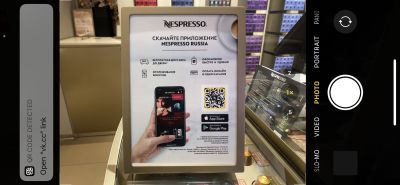
- Nespresso excels in its boutiques by accompanying QR codes with clear infographics outlining the explicit value proposition of downloading its mobile application.
- Conversely, failing to include basic navigational instructions can stall engagement. Providing a brief text cue such as "Point your smartphone camera at the code" alongside a camera icon dramatically increases scan rates.
The Surface and Environment Trap
Physical materials dictate technical viability.

- Reflective and Transparent Surfaces: Placing a QR code on clear storefront glass—as observed at Etam Paris or Nespresso boutiques—often renders the code unreadable due to interior lighting reflections and a lack of visual contrast. While Nespresso store personnel have resorted to holding up makeshift sheets of paper behind the glass to assist customers, this workaround highlights a fundamental architectural oversight.
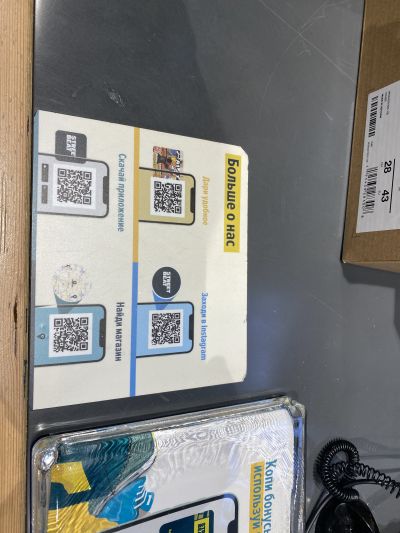
- Wear-and-Tear: Street Beat placed adhesive QR codes directly on retail checkout counters. While the location captures high-intent customers during payment, high-friction physical counters cause stickers to peel, fray, and accumulate grime, necessitating frequent replacements to maintain a professional brand image.
- Outdoor and Billboard Media: X5 Retail Group deployed street billboards featuring tiny QR codes meant to be scanned by passing pedestrians or motorists. This setup violates basic ergonomic principles: scanning a small code from a distance—or worse, from a moving vehicle—is not only ineffective but poses serious safety hazards.
The Post-Scan Experience: Avoiding the Redirection Labyrinth
Once a user successfully scans a code, the digital journey must be seamless. Enterprise errors in this phase typically stem from poor architecture:

- Native App Restrictions: When Auchan launched its "Scan & Pay" system, codes were plastered throughout stores. However, these codes could not be read by standard native smartphone cameras; they required users to have the specific Auchan app already installed and opened to a proprietary scanner. Hundreds of shoppers encountered system errors, severely damaging customer trust.
- Fragmented CTAs: Gym and wellness club Persona Sport displayed multiple distinct QR codes on a single wall placard, directing users to separate review platforms (Google My Business, Yandex.Maps, 2GIS). A superior UX strategy would employ a single, clean QR code leading to a centralized landing page where users can choose their preferred review channel.
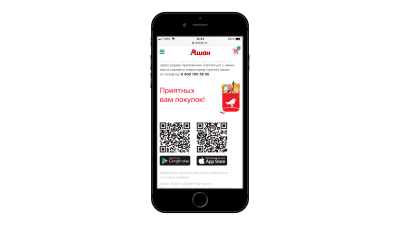
- Desktop vs. Mobile Web Disconnects: While placing a QR code on a desktop website to facilitate a seamless transition to a mobile app download is a valid strategy, duplicating this pattern on mobile websites is redundant. Users browsing on their smartphones cannot scan a code displayed on their own screens; standard HTML download buttons are required in mobile web environments.
4. Official Responses and Industry Standards
As digital touchpoints merge deeper into physical architecture, UX and brand safety standards bodies emphasize several non-negotiable rules for enterprise deployments:

- High Contrast Maintenance: Codes must strictly adhere to a "dark-on-light" contrast ratio (dark modules on a light background). Inverted codes (light-on-dark) fail on a significant percentage of legacy and budget mobile camera sensors.
- Dynamic URL Integrity: Enterprises are strongly advised to utilize dynamic QR codes linked to redirect management platforms. If a destination URL changes or a campaign expires, a dynamic code allows the underlying link to be updated without requiring the costly reimprinting of physical marketing collateral.
- Deep Linking and Device Agnosticism: Brands like Uniqlo utilize intelligent deep linking that automatically detects whether a scanning device runs iOS or Android, routing the user directly to the appropriate app store without forcing them to make manual selections.
5. Strategic Implications for Enterprise Businesses
The shift toward physical-digital integration carries profound strategic implications for marketing, IT, and customer service departments:
- Attribution and Analytics: By embedding unique UTM parameters into QR code URLs, organizations can accurately attribute offline foot traffic and physical advertising spend (such as billboards, print catalogs, or vehicle wraps) to specific digital conversion funnels. Personalization parameters can even route feedback forms to individual staff IDs, elevating operational accountability.
- Brand Perception: A poorly printed, pixelated, expired, or unscannable QR code signals corporate neglect. In contrast, a well-branded, high-resolution code featuring corporate colors and a centered logo reinforces technical competence and attention to detail.
- The Cost of Poor UX: Fixing a broken digital link on a website takes seconds; replacing thousands of printed restaurant menus, retail window decals, or outdoor billboards due to inadequate pre-print testing represents a massive financial and logistical burden.
Conclusion
QR codes are powerful catalysts for customer engagement, but their success hinges entirely on meticulous execution. By treating the physical scan not as the end of a marketing campaign, but as the delicate gateway to a mobile experience, businesses can transform a simple barcode into an invaluable engine for customer satisfaction and conversion.