By Carrie Webster
We are living in an era defined by a staggering, unprecedented explosion of data. Information is instantaneous, global, and omnipresent—it is the very fabric of the modern internet. News breaks as it unfolds, communication across continents happens in milliseconds, and search engines act as boundless libraries containing the sum of human knowledge. Yet, this abundance comes with a heavy tax: information overload.
In a world drowning in digital noise, finding what is relevant, accurate, and actionable at the exact moment we need it has become one of our greatest modern challenges. The key to cutting through this clutter is Information Architecture (IA)—the systematic process of categorizing, structuring, and organizing content to create clarity, meaning, and intuitive user experiences.
Main Facts: What Is Information Architecture and Why Does It Matter?
At its core, as defined by the Information Architecture Institute, IA is "the practice of deciding how to arrange the parts of something to be understandable." From a user experience (UX) perspective, this requires deeply understanding how users think, identifying the specific problems they are trying to solve, and presenting information within a logical, seamless context.

Whether designing a corporate website, enterprise software, or a smartphone application, IA begins with structural blueprinting. This blueprint is then translated into a navigation hierarchy that makes logical sense to the end-user.
Why IA Matters for Users
Good information architecture acts as an invisible guide, reducing cognitive load and helping users achieve their goals with minimal friction.
- Orientation: Users always know where they are, where they came from, and how to get back.
- Clarity: Language and categorization align with the user’s mental model rather than internal corporate jargon.
Why IA Matters for Business
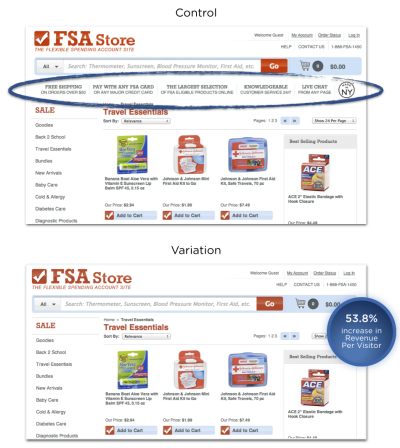
For organizations, effective IA is directly tied to operational success and revenue generation. Case studies in e-commerce consistently prove that streamlining navigation and removing superfluous structural elements can drive dramatic increases in customer conversion rates. For instance, removing redundant vertical clutter between search bars and product displays has been shown to boost customer revenue by over 50% by accelerating the path to purchase.
Chronology: The Evolution of Search vs. Navigation
The debate over how users prefer to find information has evolved significantly alongside the growth of the internet:
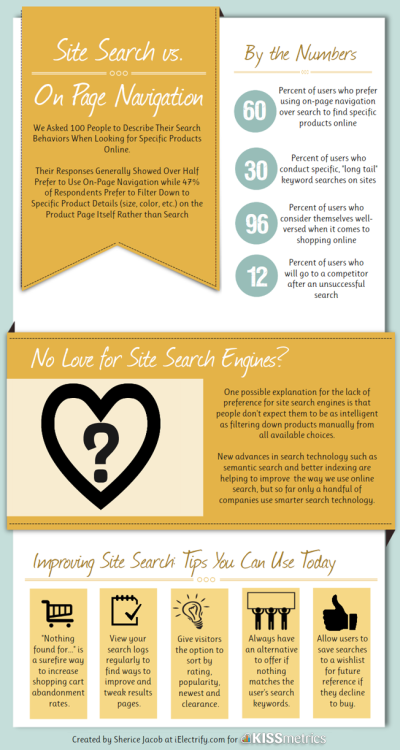
- 1997: Usability pioneer Jakob Nielsen conducted foundational research indicating that over 50% of website users preferred using a site’s search function over traditional navigation.
- 2010: A study by Gerry McGovern found that roughly 30% of users favored search, emphasizing the enduring importance of browse-based navigation.
- 2012: Econsultancy and Kissmetrics data revealed that between 30% and 40% of e-commerce visitors gravitated directly toward site search, solidifying search as a primary discovery tool.
- Present Day: Modern UX consensus indicates that users do not rely on just one method; rather, they fluidly switch between browsing structured navigation and executing targeted searches depending on their immediate intent.
Supporting Data: Understanding Search, Synonyms, and Metatags
To build an effective system, designers must understand user behavior. Research from MeasuringU indicates that approximately 14% of users begin their journey with a search query, while the overwhelming majority (86%) start by browsing structured navigation menus.
However, relying solely on navigation menus can introduce friction. Consider a consumer looking for "antibacterial hand wash" on a health products website. If the site only offers broad categories like "Body Washing Products" and "Skin Cleansers," and lists items alphabetically, the user may struggle to find the exact product. Different users use varied terminology—such as "hygienic soap," "germ-killing wash," or "sanitizing cleanser."
Because it is impossible to cater to every synonym within a visible menu hierarchy, a robust information architecture pairs navigation with a well-optimized site search backed by metatags. By assigning hidden keyword tags to products, a search engine can successfully match diverse user queries to the correct item, regardless of the terminology used.
Good vs. Bad IA in Practice
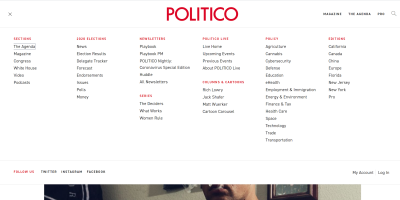
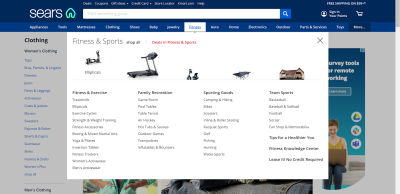
- Good IA Examples: Brands like Sears utilize mega drop-down menus with clear sub-categorization and visual imagery to speed up human cognition. Pinterest utilizes search as navigation, turning massive volumes of user-generated content into an easily digestible, visually driven ecosystem.
- Bad IA Examples: Websites that suffer from information overload—cramped layouts, poor white space, and an overwhelming array of unorganized choices—frequently frustrate users, leading to high bounce rates and abandoned carts.
Official Responses and Best Practices: How to Get IA Right
Designing effective information architecture requires proven methodologies and testing tools to ensure the structure resonates with real users.

1. Card Sorting
Card sorting is a fundamental UX technique where participants group navigation topics into categories that make sense to them.
- Open Card Sort: Participants create their own category names, helping designers understand natural mental models.
- Closed Card Sort: Participants sort content items into pre-determined top-level categories.
2. Scenario Testing and Wireframing
By utilizing clickable prototypes, designers can observe users attempting to complete specific tasks—such as registering, booking an event, and publishing it—identifying where navigation breaks down.

3. Validation Tools
- Treejack: A specialized testing tool that evaluates a site’s tree structure by asking users where they would look to find specific information, highlighting structural flaws without the distraction of visual design.
- Keyword Tools: Platforms like AnswerThePublic allow designers to analyze real-world search queries and vernacular, ensuring that navigation labels match the actual language used by the audience.
Implications: The Broader View of the Information Age
Zooming out from digital wireframes reveals a much larger canvas: the Information Age. Unprecedented access to data has transformed society, but it has also introduced profound societal implications regarding power, truth, and security.
The Power and Peril of Information
Information is a dual-use commodity. On a societal level, transparent data sharing protects public health, informs government policy, and empowers citizens. However, when weaponized, it can be used for political propaganda, fear-mongering, and financial exploitation.
The dark side of information control was tragically embodied by internet activist Aaron Swartz, co-creator of Reddit, who campaigned fiercely against corporate paywalls and internet censorship before his untimely death in 2013. Swartz’s legacy underscores a vital truth: information is power, and how we curate, protect, and distribute it matters deeply.
Misinformation and "Fake News"
The modern landscape is increasingly plagued by misinformation, ranging from unverified viral claims and political rhetoric to unfounded conspiracy theories. Without robust verification processes and critical analysis, consumers easily fall victim to fabricated correlations between unrelated data points.
Information Security and Privacy
The stakes of data management extend far beyond usability; they touch fundamental human rights. High-profile security breaches—such as the massive 2018 Facebook data exposure and the 2017 Equifax breach, which compromised the personal data of over 147 million Americans—demonstrate the catastrophic fallout of lax data stewardship.
In response, global legislative frameworks have rapidly evolved. Currently, 132 out of 194 countries have enacted data protection laws to regulate the collection and sharing of personal information without consent, reflecting a 10% global rise in privacy legislation over recent years.

Conclusion
Information architecture is far more than just organizing website menus; it is a foundational discipline for bringing order to a chaotic world. By understanding the psychology of users, leveraging both structured navigation and intelligent search, and recognizing the broader societal weight of the Information Age, designers and organizations can build systems that do more than just function—they enlighten, protect, and simplify our daily lives.