Beyond the Endless Scroll: Redefining UX Best Practices for Modern Data and E-Commerce Navigation
In the ever-evolving landscape of digital product design, few UI patterns evoke as much polarizing debate as the infinite scroll. For over a decade, UX designers, frontend engineers, and product managers have locked horns over whether to embrace the frictionless, continuous stream of content or to stick to the tried-and-true conventions of traditional pagination.
While infinite scroll promises unbridled speed and seamless exploration—qualities heavily favored in modern social media and fast-paced e-commerce—it historically comes at a severe cost to usability, accessibility, and user agency. However, industry standards are shifting. By combining the speed of continuous loading with the structural comforts of pagination, sticky footers, and dynamic bookmarking, designers are beginning to tame the information abyss.
Main Facts: The Battle Between Speed and Usability
At its core, the infinite scroll dilemma boils down to a fundamental trade-off: speed versus control.
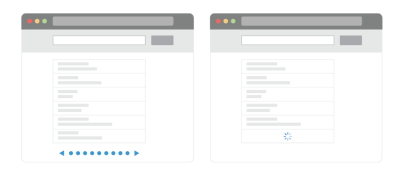
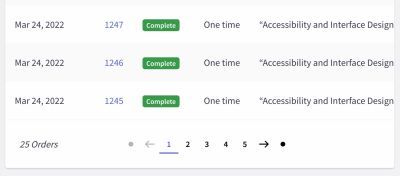
When users encounter long-winded lists of search results, product catalogs, or enterprise data entries, their primary goal is to explore relevant options efficiently. Traditional pagination offers a predictable, structured environment. Users experience a clear beginning and end, easily track what they have or haven’t seen, navigate via distinct URLs, and reach the website footer without engaging in a frustrating game of cat-and-mouse with auto-loading content.
Conversely, infinite scroll removes these artificial boundaries. Items load automatically as the user moves down the page, significantly accelerating browsing velocities. Yet, this speed introduces notorious usability pitfalls:
The Information Abyss: Users are easily overwhelmed by an endless stream of options, frequently leading to choice paralysis and page abandonment.
Broken Scrollbars: Because the page length continually changes as new items load, the scrollbar ceases to be a reliable indicator of document length or position.
Navigation and Bookmarking Nightmares: Users cannot easily save or share their exact location within an infinite stream, nor can they reliably use the browser’s "Back" button to return to a specific spot.
The Footer Trap: Reaching the footer—where vital site links, contact information, and legal policies usually reside—becomes an acrobatic challenge as new content continuously pushes the footer out of reach.
Accessibility and Performance Hurdles: Screen readers often struggle to announce newly injected items properly, and choppy network connections can cause layout shifts and performance degradation.
Chronology of an Interface Evolution: From Static Pages to Dynamic Streams
The debate over content loading patterns has undergone a distinct generational shift over the past twenty years.
Phase 1: The Reign of Traditional Pagination (Early Web Era)
In the formative years of the web, pagination was the undisputed standard. Search engines like Google and early e-commerce giants relied entirely on numbered page links (1, 2, 3…) and "Next/Previous" buttons. This era prioritized server-side rendering limits and user orientation. Users accepted the friction of page loads in exchange for absolute control and predictability.
Phase 2: The Social Media Disruption and "Load More" (2010s)
With the rise of social media platforms like Twitter, Facebook, and Pinterest, infinite scroll exploded in popularity. Users no longer wanted to click "Next Page" to see the next photo or status update; they wanted an uninterrupted river of content. E-commerce platforms quickly attempted to adopt this trend, leading to widespread usability friction as shopping behavior fundamentally differs from casual social media consumption.
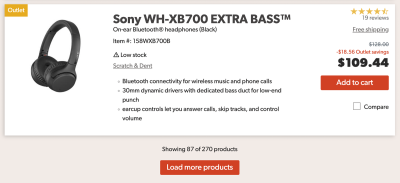
To bridge the gap, the "Load More" button emerged as a compromise. By requiring a deliberate click or tap after an initial batch of items loaded automatically, platforms restored a measure of user control while maintaining momentum.
Phase 3: The Hybrid Renaissance (Present Day)
Today, leading UX researchers and interaction designers are pioneering sophisticated hybrid models. Recognizing that neither pure pagination nor unmanaged infinite scroll is universally ideal, modern interfaces implement dynamic pagination, footer reveals, and position bookmarking. These techniques aim to deliver the velocity of infinite scrolling wrapped in the structural safety of traditional design patterns.
Supporting Data: What Usability Research Tells Us
Empirical research from leading UX authorities, including the Nielsen Norman Group and the Baymard Institute, highlights the psychological and behavioral impacts of these navigation patterns.
Engagement vs. Frustration: Usability studies consistently show that while users browse faster and view more total items under an infinite scroll model, their engagement often becomes superficial. They are less likely to utilize complex sorting and filtering tools deeply because the sheer volume of data overwhelms them.
The "Load More" Threshold: Data from major retail implementations indicates that optimal performance often lies in a hybrid approach. For instance, allowing products to load automatically for the first few scrolls (e.g., up to 30–50 items) satisfies the initial urge for speed. Once that threshold is crossed, introducing a "Load More" button prevents the cognitive overload associated with truly endless scrolling.
The Power of Spatial Anchors: According to Baymard Institute’s research on e-commerce filtering, integrating dynamic range indicators—such as pricing intervals mapped directly to the scrollbar—drastically improves a user’s ability to navigate large datasets without getting lost.
Official Industry Responses and Expert Perspectives
Design leaders and educators are actively pushing back against sloppy implementations of infinite scroll, advocating instead for rigorous accessibility and structural integrity.
Industry veterans, such as Vitaly Friedman of Smashing Magazine, emphasize that infinite scroll should never be deployed by default. In ongoing UX training frameworks and design pattern guides, experts argue that infinite scroll is fundamentally unsuited for tasks requiring heavy comparison, detailed data analysis, or targeted searches.
"Infinite scroll is not for every website," design experts note. "An endless list of options needs to be complemented with proper filtering, sorting, and search. If your users are more likely to compare options or find very specific content, infinite scroll probably won’t be very useful."
However, when a business model does rely heavily on exploratory browsing—such as fast-fashion e-commerce, content feeds, or data-heavy dashboards—experts outline strict requirements for compliance and user accommodation. Official recommendations from accessibility advocates mandate that any dynamic content injection must be fully keyboard-accessible and properly announced to screen reader software via ARIA live regions.
Implications: Building a Better Infinite Scroll
If product teams determine that infinite scroll is a business-critical requirement, they must invest the engineering and design resources necessary to neutralize its inherent flaws. Implementing a modern, user-friendly infinite scroll requires a comprehensive suite of enhancements:
1. Position Bookmarking and URL States
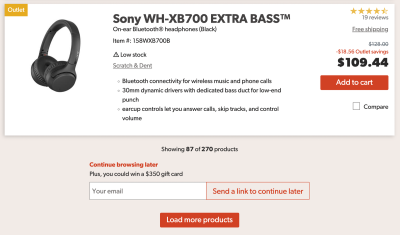
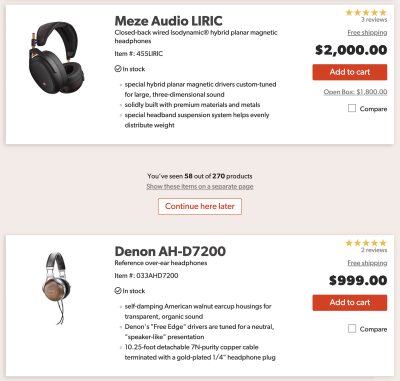
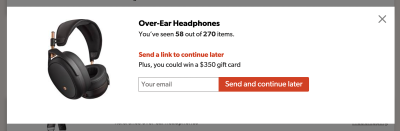
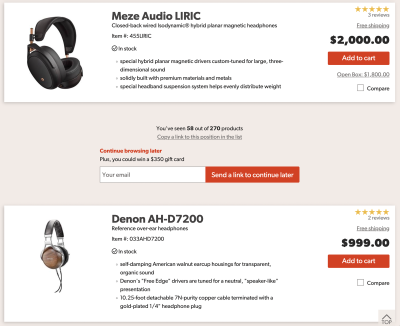
To solve the inability to share or return to a specific location, modern interfaces update the URL or page segment dynamically as the user scrolls. Furthermore, providing explicit tools—such as a "Copy a link to this position in the list" button or a modal allowing users to email their current location to themselves—bridges the gap between cross-device browsing sessions.
2. The Footer Reveal Pattern
To ensure the footer remains accessible without forcing users into a frantic race against auto-loading data, designers are implementing footer reveals. By anchoring a persistent, accessible trigger (such as a sticky tab in the bottom corner of the viewport), users can summon or dismiss the site footer instantly via mouse click, touch, or keyboard navigation.
3. Dynamic Pagination Indicators
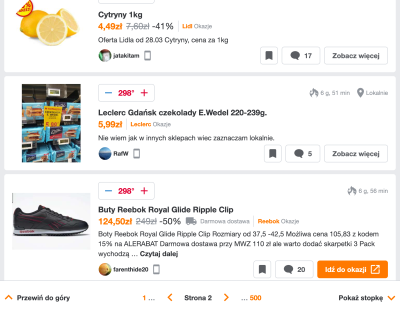
Platforms like Pepper.pl demonstrate the viability of combining infinite scroll with dynamic pagination. As the user scrolls through an endless stream, a sticky bottom bar updates the current "page" number and changes the browser URL accordingly. Crucially, a drop-down menu allows users to jump instantly to any specific section or page without manually scrolling through thousands of items.
4. Visual Breakpoints and White Space
Marking clear visual breaks between "old" and "new" batches of content prevents user disorientation. Generous white space and clear section headers allow users to process information in digestible chunks rather than drowning in an endless wall of data.
Conclusion
Ultimately, refining the infinite scroll is no simple shortcut; it demands meticulous attention to detail, rigorous usability testing, and a commitment to accessibility and performance.
While pagination offers comforting predictability and infinite scroll provides blistering speed, the future of interface design belongs to the hybrid approach. By respecting user agency, preserving navigation history, and keeping the footer within arm’s reach, designers can finally harness the benefits of continuous loading without sacrificing the human experience.