In the ever-evolving landscape of digital product design, few interface patterns evoke as much polarizing debate as the infinite scroll. For decades, developers and UI/UX designers have wrestled with a fundamental tension: how to present sprawling inventories of products, search results, or data logs without overwhelming the user.
While traditional pagination offers a reliable, predictable sense of closure, it often slows down discovery and dampens overall engagement. Conversely, infinite scroll provides exhilarating speed and frictionless browsing, yet frequently devolves into an "information abyss" plagued by broken scrollbars, unreachable footers, and lost browsing positions.
However, recent advancements in interface design patterns suggest that infinite scroll does not have to be an all-or-nothing proposition. By incorporating smart architectural workarounds—such as dynamic pagination, explicit visual breaks, footer-reveal helpers, and position-bookmarking tools—designers can harness the speed of continuous feeds while retaining the structural comfort of classic pagination.
Main Facts: The Core Dilemma of Continuous Discovery
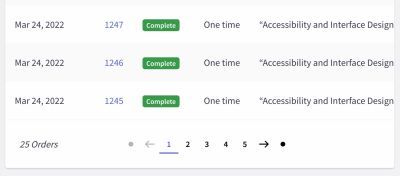
The central challenge in long-list management is helping users explore relevant entries quickly and intuitively. When faced with extensive catalogs, natural design instincts often gravitate toward pagination. Users get a clear beginning, a predictable middle, and a definitive end. They feel in control of how much data is displayed, URLs update cleanly per page, and the footer remains easily accessible.

Yet, usability studies consistently reveal a dark side to pagination: it is slow. Compared to continuous feeds, paginated interfaces often result in significantly fewer items viewed and lower overall user engagement.
On the other end of the spectrum lies the standard infinite scroll, praised for its velocity but notorious for severe usability flaws:
- The Information Abyss: As options multiply beyond a comfortable range, users experience cognitive overload, frequently abandoning the page entirely.
- Loss of State and History: The browser’s back button and URL history are frequently broken, making it nearly impossible to bookmark a specific location or share a precise list view with a colleague or friend.
- The Elusive Footer: Because new content streams in dynamically upon scrolling, reaching the page footer becomes a frustrating game of timing and frantic keyboard shortcuts.
- Compromised Scrollbars: The scrollbar acts as a visual promise of page length. Infinite scrolls continuously break this promise, rendering the scrollbar practically useless for spatial orientation.
- Accessibility and Performance Barriers: Screen readers struggle to announce dynamically injected items properly, and users on choppy network connections often experience severe layout shifts and performance stutter.
Chronology: The Evolution from Static Pages to Hybrid Feeds
To understand where modern UI design is heading, it is helpful to trace how listing patterns have evolved over the years.
Phase 1: The Era of Strict Pagination
In the early days of the web, technical limitations and content organization models heavily favored multi-page partitioning. Every 10 to 50 items required a hard reload. While performant and structurally sound, this approach created a rigid browsing rhythm that eventually felt restrictive as mobile browsing and content consumption accelerated.
Phase 2: The Social Media and E-Commerce Boom
With the rise of social feeds (like Twitter and Facebook) and modern e-commerce catalogs, infinite scroll gained massive popularity. The goal was maximum retention and seamless consumption. Users loved the speed, but enterprise sites, data dashboards, and complex shopping portals quickly realized that endless feeds broke fundamental user workflows—particularly when shoppers needed to compare items or access footer links, terms, and customer service portals.
Phase 3: The "Load More" Compromise
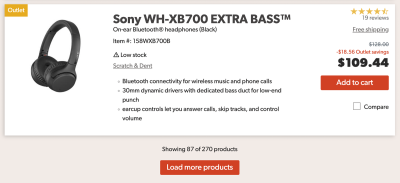
As backlash against pure infinite scroll mounted, the "Load More" button emerged as a popular middle ground. Users would scroll through an initial batch of items automatically, but further content loading required a deliberate click. This restored a degree of user agency, though it still lacked deep spatial awareness within massive datasets.
Phase 4: The Rise of Hybrid and Context-Aware Patterns
Today, leading UX practitioners are shifting toward sophisticated hybrid patterns. By merging infinite scroll with dynamic pagination, sticky footer reveals, and position-bookmarking tools, designers are successfully bridging the gap between high-speed browsing and structural predictability.
Supporting Data: What Usability Research Tells Us
Industry research—including ongoing insights from usability authorities like the Baymard Institute and Nielsen Norman Group—highlights distinct behavioral patterns when users interact with long lists:
- Engagement Discrepancies: Users browsing through infinite-scroll or hybrid interfaces typically consume more items per session than those restricted to strict pagination, primarily due to reduced friction.
- The Threshold Effect: Data from large-scale e-commerce implementations shows that automatic loading works exceptionally well for the first few dozen items (e.g., initial loads of 10–30 items, scaling up to roughly 50–70 items before shifting behavior).
- The Need for Spatial Anchors: When sorting options—such as filtering by price—users heavily rely on visual indicators to understand where they are positioned within a continuum. Without visual range intervals, users lose their mental model of the catalog.
Official Responses and Industry Best Practices
Industry experts and design system architects emphasize that infinite scroll should never be deployed blindly. It requires rigorous alignment with user goals. If a website’s primary function is comparative shopping or precise data retrieval, infinite scroll is rarely appropriate. However, if exploratory browsing is the core activity, infinite scroll can thrive—provided specific design guidelines are met.
1. Bookmarking and Position Sharing
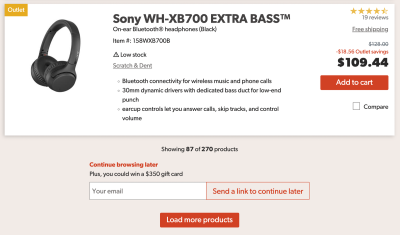
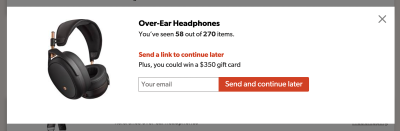
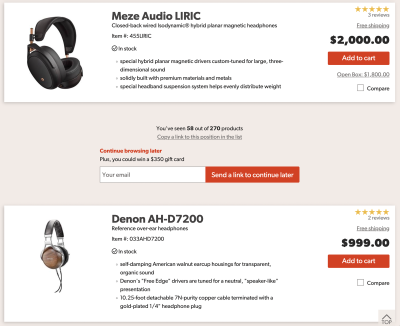
To fix the issue of lost states, modern interfaces allow users to copy a direct link to their exact position in a list. Alternatively, platforms can prompt users to save their spot via an email link, facilitating seamless cross-device browsing.
2. Visual Separation of "Old" and "New" Segments
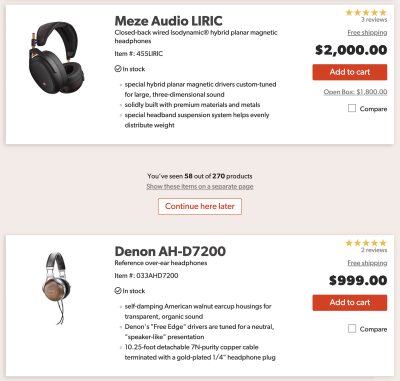
Introducing clear whitespace and distinct visual dividers between automatically loaded batches prevents the feeling of an endless, unstructured stream. Users can easily identify what they have already reviewed.
3. Implementing Footer-Reveal Mechanics
Rather than forcing users to race against incoming content to reach the footer, designers now utilize persistent sticky controls or footer-reveal toggles (accessible via both mouse clicks and keyboard navigation) that bring up essential site links instantly without disrupting the feed.
4. Dynamic Pagination and URL Synchronization
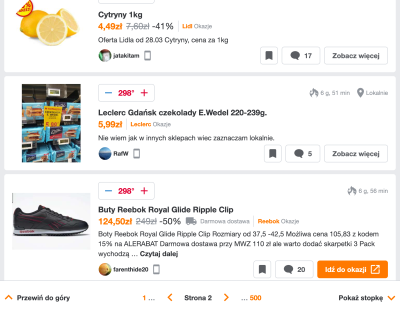
Advanced implementations update the URL and page indicator in a sticky bottom bar as the user scrolls. Combined with a drop-down page selector, users can enjoy the speed of continuous scrolling while retaining the ability to jump to "Page 4" or "Page 12" instantly.
Implications for Future Interface Design
The movement toward refined, accessible infinite scroll carries profound implications for web developers, enterprise software engineers, and e-commerce architects alike.
Designing these hybrid systems requires significantly more front-end engineering effort, state management, and accessibility planning than dropping in a standard pagination plugin. Screen reader compatibility, keyboard focus management, and dynamic DOM rendering must be meticulously optimized to ensure smooth performance across various devices and network conditions.
Ultimately, these investments pay off by aligning high-performance engagement loops with uncompromising usability standards. As frameworks evolve and design systems mature—such as those explored in comprehensive UX curricula and interface pattern courses—the days of thoughtless, frustrating infinite scrolls are giving way to intelligent, user-centric continuous discovery.