Main Facts: The Eternal UX Debate
For decades, digital product designers have locked horns over a deceptively simple interface challenge: how to display long, sprawling lists of search results, products, orders, or data entries without sending users into an information abyss. On one side of the ring sits good old-fashioned pagination—predictable, structured, and safe. On the other side is infinite scroll—fast, immersive, and dangerously capable of overwhelming the human brain.
While infinite scroll has become the undisputed champion of social media feeds like X, Instagram, and TikTok, its implementation in e-commerce, enterprise software, and content-heavy directories has historically resulted in poor user experience (UX). Users frequently drown in endless streams of data, lose their exact place when navigating away, struggle to reach the footer, and run into severe accessibility and performance hurdles.
However, recent UI/UX research indicates that infinite scroll does not need to be an all-or-nothing proposition. By combining the speed of continuous loading with the structural safety nets of pagination—such as dynamic URL updates, sticky footer reveals, bookmarking, and range indicators—designers can successfully bridge the gap between usability and efficiency.
Chronology: The Evolution of List Navigation
To understand where modern interface design is heading, it helps to look at how we arrived here:

- The Early Web Era (Pagination): Early websites relied exclusively on pagination. Users traversed data page by page (e.g., Page 1 of 45). This provided a clear beginning and end, distinct URLs for bookmarking, and reliable access to page footers. However, usability testing repeatedly proved that pagination felt slow, forcing users to click through multiple pages and limiting total exploration.
- The Social Media Boom (Pure Infinite Scroll): Propelled by modern web applications, infinite scroll emerged as a seamless way to consume content. As users scrolled to the bottom, new entries fetched automatically. While this maximized browsing speed, it notoriously broke native browser scrollbars, destroyed page history, and eliminated footers.
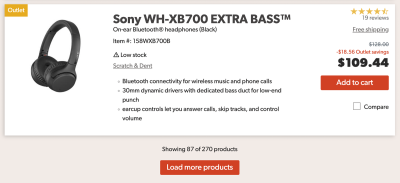
- The Hybrid Experimentation Phase: Recognizing the flaws of pure infinite scroll, developers began experimenting with hybrid patterns. The "Load More" button gained traction in e-commerce, giving users intermittent control.
- The Modern Synthesis (Dynamic Pagination & Smart Tooling): Today, advanced UI patterns combine the best of both worlds. Platforms now implement dynamic pagination, sticky footer reveals, visual separation between "old" and "new" segments, and bookmarkable location states, transforming infinite scroll from a frustrating trap into a polished user journey.
Supporting Data: Why Infinite Scroll Fails (and Where It Succeeds)
Usability studies from prominent UX research organizations, including the Nielsen Norman Group and the Baymard Institute, highlight why standard infinite scroll often collapses under real-world usage:
- The Information Abyss: Once the number of displayed options exceeds a comfortable cognitive range, a significant percentage of users abandon pages altogether. Without a clear endpoint, the psychological weight of an endless list leads to fatigue.
- Loss of Control and Orientation: In a traditional infinite stream, there is no easy way to navigate between "old" and "new" segments. Once a user scrolls up and down past a few items, identifying what has already been viewed becomes an exercise in frustration.
- Broken Scrollbars: A scrollbar acts as a visual promise of a page’s actual length. Infinite scrolling continuously recalibrates this length, rendering the scrollbar misleading and disorienting.
- Accessibility and Performance Barriers: Screen readers frequently struggle to properly announce newly injected DOM elements. Furthermore, on choppy mobile connections, rapid scrolling triggers performance bottlenecks.
Despite these flaws, data shows that users browse more items and display higher engagement rates when content loads continuously. The challenge for modern designers is mitigating the usability penalties without sacrificing that core velocity.

Official Perspectives and Industry Insights
Leading interface designers and researchers argue that the decision to use infinite scroll must be driven strictly by user intent rather than aesthetic trends.
According to guidelines synthesized from ongoing UX research and design patterns:
- When to Avoid It: If your users are attempting to carefully compare options, audit specific data points, or locate precise entries (such as in complex B2B enterprise software or niche search filters), infinite scroll is fundamentally the wrong choice. Pagination remains superior for structured evaluation.
- When to Embrace It: If your platform thrives on exploratory browsing—such as e-commerce shopping catalogs where users naturally add multiple items to a cart or examine large visual collections—infinite scroll is worth the engineering effort, provided accessibility and performance are prioritized.
Industry experts emphasize that fixing infinite scroll requires intentional, multi-layered UI interventions. It is no longer acceptable to dump data into an endless DOM tree and leave users stranded.
Implications: Practical Solutions for a Better Infinite Scroll
If a project demands infinite scroll, designers must implement specific architectural workarounds to resolve its inherent usability flaws.
1. Visual Breaks and Bookmarking
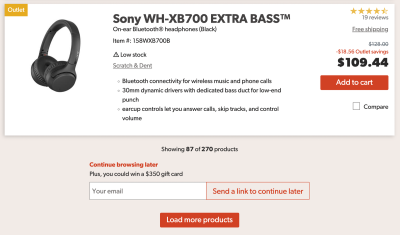
To prevent users from losing their place, interfaces should introduce distinct visual whitespace or milestone markers separating "new" and "old" batches of content. Furthermore, allowing users to copy a direct link to their current position in the list—or prompting them to save their location via email for cross-device browsing—eliminates the frustration of starting over.
2. The Sticky "Footer Reveal"
One of the most persistent complaints about infinite scroll is the impossibility of reaching the footer. Modern UX patterns solve this via a "footer reveal" mechanism—a persistent, accessible toggle (often anchored in a bottom-navigation bar) that opens an accordion or overlay housing the footer content on demand, complete with full keyboard navigation support.
3. Dynamic Pagination and URL Management
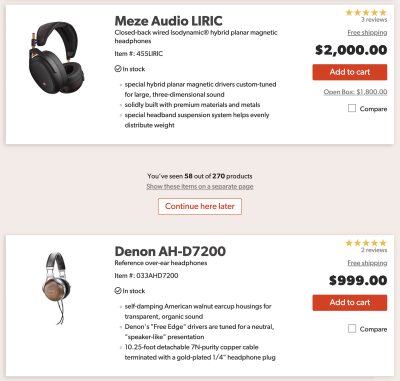
Instead of leaving the address bar static, advanced implementations update the URL and page number dynamically as the user scrolls. Pairing this with a compact pagination dropdown allows users to instantly jump to specific segments (e.g., jumping from page 2 to page 15) while retaining the smooth browsing experience of infinite scroll.
4. Range-Indicator Scrollbars and Mini-Maps
Drawing inspiration from advanced research by organizations like the Baymard Institute, scrollbars can be enhanced with dynamic, vertically spaced range labels (such as price intervals or alphabetical markers). Experimental "mini-map" concepts even allow users to pin specific areas of interest, creating visual signposts in an otherwise featureless stream of data.

Conclusion
Fixing infinite scroll requires a significant investment in design and engineering. Ultimately, whether this effort is worthwhile depends entirely on your users’ primary goals. While infinite scroll is not a universal panacea, it can be redeemed through thoughtful guardrails: preserving user orientation, maintaining URL history, keeping footers accessible, and ensuring robust accessibility standards.
When executed correctly, a well-engineered infinite scroll merges the speed of continuous discovery with the comfort and structure of traditional pagination—proving that designers no longer have to choose between velocity and usability.