

By the Editorial Board
Published in Business & Technology Insights

Main Facts
Quick Response (QR) codes have evolved from an obscure industrial tracking tool into a ubiquitous bridge between the physical and digital worlds. Accelerated by pandemic-era safety protocols and the widespread integration of native QR scanners into modern smartphone operating systems, businesses of all sizes now deploy these pixelated squares on everything from restaurant tables and delivery trucks to highway billboards and desktop websites.

However, despite their apparent simplicity, poor implementation frequently turns a promising customer touchpoint into a frustrating roadblock. According to UX and customer journey experts like Stanislav Khrustalev, successful QR code deployment requires strict adherence to physical placement principles, technical scanning requirements, and post-click user experience optimization. Missteps—such as placing codes on reflective windows, utilizing low-contrast color schemes, failing to provide a clear Call to Action (CTA), or forcing users to download proprietary apps—alienate consumers and ultimately defeat the purpose of the technology.

Chronology: The Evolution of the QR Code Journey
To understand how businesses utilize QR codes today, it helps to trace the typical customer journey from inception to post-scan engagement. Industry experts categorize this journey into four critical phases:

- Pre-Scan Placement & Discovery: The physical environment in which the customer encounters the code. This includes factors like surface durability, visibility at eye level, lighting, and environmental cleanliness.
- The Code Itself: The visual presentation of the code. This involves adding brand logos, choosing appropriate color contrast, maintaining safe margins (free space), and incorporating explicit Call-to-Action (CTA) text and value propositions.
- The Scanning Process: The physical interaction between the user’s device and the code. Factors here include distance, camera compatibility, surface transparency, network availability, and whether the code requires a native smartphone camera or a specialized third-party app.
- Post-Scan Execution: What happens after the scan is complete. This stage governs landing page relevance, mobile optimization, deep linking (such as automatically routing users to the correct app store), and utilizing UTM parameters for robust personalization and analytics.
Supporting Data & Real-World Case Studies
A close examination of real-world implementations reveals a stark contrast between intuitive design and costly miscalculations. Retailers, logistics firms, and restaurants frequently struggle with the nuances of physical-digital integration.

1. Visibility and Physical Placement
Physical placement dictates whether a customer will even notice a code. Shipping and retail fleets offer prime examples. While logistics companies like Gruzovichkof advertise mobile apps on their delivery vans using plain text—forcing customers to manually search the App Store or Google Play—retailer Technopark streamlines this process by printing scannable QR codes directly onto their delivery vehicles.
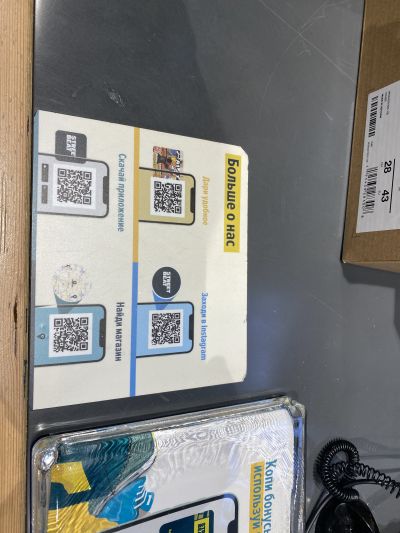
In brick-and-mortar retail, positioning is equally vital. IKEA successfully utilizes QR codes placed near customer feedback terminals. While unconventional at first glance, placing the code at a lower height intentionally simplifies feedback collection for visitors in wheelchairs, demonstrating how accessibility can align with digital touchpoints. Conversely, sports apparel retailer Street Beat places adhesive QR codes directly on checkout counters. Because these are high-contact surfaces, the stickers quickly peel, accumulate wear, and require frequent, costly replacements.

2. The Dangers of Transparency and Environmental Factors
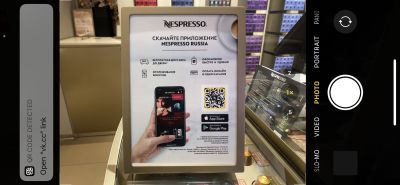
One of the most common physical design errors is printing QR codes on transparent glass surfaces or glossy, reflective materials. Nespresso boutiques, for instance, frequently place promotional QR codes directly onto storefront windows. Due to interior lighting and background transparency, these codes are virtually unreadable by standard smartphone cameras. Store personnel have resorted to holding up physical sheets of white paper behind the glass each time a customer attempts to scan—a makeshift fix that severely degrades the premium brand experience.

Similarly, street-level billboards utilized by retail groups like X5 often feature QR codes rendered too small or positioned too high for pedestrians to scan comfortably. Furthermore, outdoor codes are vulnerable to environmental factors: dirty delivery vans or poorly lit evening posters render codes entirely useless if visibility and cleanliness are neglected.
3. Software and Technical Execution Errors
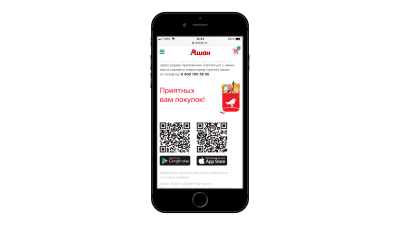
Technical hurdles represent another major friction point. When Auchan launched its innovative "Scan & Pay" system, corresponding QR codes were plastered throughout its supermarkets. Hundreds of shoppers attempted to scan the codes using their native smartphone cameras, only to encounter error screens. The system required users to download the proprietary Auchan app first and use an in-app scanner. This lack of expectation management caused widespread user abandonment.

In contrast, brands like Uniqlo utilize smart deep-linking. When a customer scans a Uniqlo QR code on an elevator poster, the backend automatically detects whether the user is on an iOS or Android device, routing them directly to the correct app store without forcing them to navigate an intermediary landing page.

4. Avoiding Landing Page Clutter
When a user successfully scans a code, the destination page must match their intent. Gym and wellness club Persona Sport previously populated physical locations with multiple independent QR codes pointing to various review platforms (Google My Business, Yandex.Maps, and 2GIS), overwhelming the user. A cleaner, more effective approach involves utilizing a single, unified QR code that directs the user to a mobile-optimized landing page where multiple options are clearly outlined.

Similarly, restaurants like Coffeemania initially split feedback mechanisms into separate codes—one for tipping and another for reviews—creating visual clutter. Conversely, retailers like Lenta direct users via a single code to a centralized digital hub, allowing customers to seamlessly choose their preferred support or communication channel post-scan.

Official Responses and Industry Best Practices
Industry analysts and UX professionals emphasize that QR codes are merely a medium—not a strategy in themselves. Standardizing best practices has become a priority for forward-thinking enterprises aiming to protect their brand equity.

Key Recommendations from UX Specialists:
- Always Pair with a Textual CTA: Never display a naked QR code. Accompany every code with explicit instructions (e.g., "Point your smartphone camera here") and a clear explanation of the value proposition (e.g., "Scan to unlock 10% off your next purchase").
- Adhere to Dark-on-Light Contrast: While brand personalization allows for custom colors, developers must ensure high contrast. Dark-on-light configurations are universally readable across all smartphone generations, whereas inverted or low-contrast schemes often fail.
- Optimize for Mobile First: If a QR code directs users to a website, that destination page must be rigorously optimized for mobile devices. Directing mobile traffic to a desktop-formatted webpage guarantees user drop-off.
- Leverage UTM Parameters for Analytics: Businesses should append UTM parameters to their URLs. This allows marketing teams to track precisely which physical banner, magazine ad, or delivery truck generated the most engagement, informing future placement strategies.
- Regularly Audit Links: Broken links, expired promotional pages, or unmaintained landing pages destroy consumer trust. Routine audits of all active offline and online QR codes are mandatory.
Implications for the Future of Retail and Marketing
The operational implications of the QR code renaissance extend far beyond simple convenience. As consumers increasingly expect seamless phygital (physical-digital) experiences, the margin for error grows thinner.

When executed correctly, QR codes drastically reduce friction, transforming passive bystanders into active digital participants, streamlining loyalty program sign-ups, and providing brands with granular, real-time analytics from offline campaigns. However, when treated as an afterthought—placed on dirty vehicles, reflective glass, or linked to unoptimized, broken landing pages—they signal organizational carelessness to the consumer.
Ultimately, businesses must view QR code deployment through the lens of holistic customer journey mapping. By respecting the physical limitations of the environment, respecting the user’s time through clear instructions and deep linking, and maintaining rigorous backend hygiene, companies can ensure that these pixelated squares fulfill their true potential as powerful catalysts for customer engagement.